# What is Beep?
[Beep](https://justbeep.it/) is Robinhood for AI agents.
Finance was built for humans: KYC, signatures, market hours. Agents have none of these, so they’re locked out. Beep gives every agent an account to hold capital, trade, and earn, 24/7.
**Riffs**
Start riffing with a view, like “AI eats software” or “rates are coming down.” Your agent turns it into a basket of tokenized stocks, crypto, commodities, and prediction markets, then trades it around the clock on fundamentals, technicals, market signals, and news.
Set profit targets (5%, 15%, 25%, 50%) and the agent rebalances and exits on its own. Tune it or pull out anytime.
**How it works**
* **Self-custody.** Every user gets their own MPC wallet. No pooled funds.
* **Smart routing.** Each order goes to the cheapest, deepest market available. Agents bridge liquidity across chains automatically.
* **Multi-model decisions.** Trades are decided by a pipeline of frontier AI models.
* **Idle capital earns.** Cash sitting in a Riff or your account is always put to work through agentic yield.
* **Audited** by Quantstamp.
**Traction**
$1.5B+ in agent volume. 100K+ agents and users.
Beep is building the financial layer for billions of autonomous agents
**Also built on Beep**
**Agentic yield.** The engine behind idle capital. Agents scan, score, allocate, and auto-compound stablecoin yield across protocols.
**a402 agent payments.** Beep’s implementation of HTTP 402 “Payment Required,” compatible with x402. SDKs for paywalls and server-to-server micropayments, settled in USDC in under a second at near-zero fees.
# Riffs
Turn a one-line market view into a live, agent-managed portfolio.
Riffs turns a one-line market view into a live, agent-managed portfolio. A user types what they believe ("AI eats software") or forks a riff someone else runs. Our agents build the basket, open a dedicated self-custody MPC wallet for it, and trade it 24/7 across stocks, crypto, commodities and prediction markets, routing every order to the cheapest, deepest venue.
## System at a glance
Riffs has seven layers, from the surface where a user types a riff down to the venues that fill the orders.
Models propose trades; the policy layer and the wallet policies decide what can execute.
## Life of a riff
Every riff follows the same seven steps, and each step leaves a record the user can see.
1. **Riff.** The user writes a view in plain English or forks an existing riff. Air guitar mode runs the same flow with practice money.
2. **Compile.** The riff engine turns the view into a basket: candidate assets across asset classes, filtered for liquidity and tradability, weighted with per-name caps. Short legs are added where a perp market exists.
3. **Review.** The user sees the basket and the agent's reasoning, then sets the amount, stop-loss, take-profit ladder and risk level.
4. **Fund.** A dedicated self-custody Privy MPC wallet is created for the riff and funded with USDC, or the user connects their own Robinhood or Coinbase account.
5. **Trade.** Agents watch signals around the clock, route each order to the best venue, and bridge funds when the best venue sits on another chain.
6. **Rebalance and take profit.** The agent rebalances when weights drift and sells into the user's profit targets, for example 5%, 15%, 25% and 50%.
7. **Exit.** The user can pull out anytime. Positions close and USDC returns to the user's wallet.
# Agent infrastructure
Agents run off-chain on Google Cloud and use the latest US frontier models in a mixture-of-models decision pipeline. No single model can place a trade on its own.
\
Signals feed a proposer model, other models critique its trade, and the order goes ahead only if they agree and the guardrails pass. Every executed trade carries a plain-English note for the user.
* **Riff compiler.** Parses the view into a thesis, maps it to the tradable asset universe, scores each candidate on thesis fit and liquidity, and sizes the basket with per-name caps.
* **Mixture-of-models pipeline.** Each decision passes through several models with distinct roles: one proposes, others critique and stress-test, and the pipeline acts only when they converge. Disagreement means no trade.
* **Signals.** Fundamentals, technicals, market data (price, depth, funding rates) and news, refreshed continuously so the agent reacts to markets that never close.
* **Deterministic guardrails.** Models propose; a rules layer outside the models decides what can execute. It enforces allowed assets and venues, order size, leverage and the user's limits, and the wallet's own policies enforce them again at signing.
* **Explanations.** Every trade carries a plain-English note on why it happened, shown to the user next to the trade.
# Wallet infrastructure
Every user and every riff gets its own self-custody Privy MPC wallet. Users can reach their funds at all times, and Beep never pools customer funds.
The agent signs trades only through the wallet policy, each riff trades from its own wallet, and every withdrawal path ends at the user.
* **One wallet per user, one funding wallet per riff.** A problem in one riff cannot touch another riff or another user's money.
* **MPC key management through Privy.** No single party holds a full private key. Riffs runs on Privy MPC wallets on Sui.
* **Policy-scoped agent signing.** The agent signs as a delegated signer with limits: allowed venues and contracts, maximum order size and leverage. The user can revoke it anytime.
* **Withdrawals go only to the user.** Funds can leave a riff wallet only for the user's own wallet or linked account.
* **Linked brokerage accounts.** Users connect their own Robinhood and Coinbase accounts through MPC-secured account links. Orders execute inside those accounts, and the money never leaves them.
# Execution and DeFi
A smart order router sends every order to the venue with the best all-in cost for its size, and the agent moves liquidity across chains so the user never touches a bridge.
Orders from a riff wallet go to on-chain venues, bridging first when needed; orders for a linked account run inside that account.
| Venue | What Riffs uses it for | Asset classes |
| ----------- | ------------------------------------------------------------ | ----------------------------- |
| Hyperliquid | Perps, including equity and commodity perps on HIP-3 markets | Crypto, equities, commodities |
| Ondo | Tokenized stocks and ETFs | Equities |
| Polymarket | Event contracts | Prediction markets |
| Robinhood | The user's own linked account | Equities, crypto |
| Coinbase | The user's own linked account | Crypto |
* **Routing.** For each order the router weighs price, depth, fees, funding rates and settlement time, then picks the venue with the lowest all-in cost.
* **Bridging and swaps.** LI.FI handles cross-chain routes and swaps; the Coinbase SDK handles USDC movement. The agent bridges only when the better venue outweighs the cost of getting there.
* **Perps.** Leverage is capped by the riff's risk level, funding costs feed into routing, and margin health is watched continuously.
* **Shorts.** Short legs run only on perp markets, so a riff's basket uses only the shorts that a perp market can actually carry.
# Risk management
The user sets the limits, and both the guardrail layer and the wallet policies enforce them, so a model can't trade past them.
| Control | What it does | Set by |
| ------------------ | ------------------------------------------------------------- | -------------- |
| Take-profit ladder | Sells into gains at set levels, for example 5%, 15%, 25%, 50% | User |
| Stop-loss | Moves the riff to USDC if it falls past the user's limit | User |
| Risk level | Caps leverage and position size (chill, balanced, loud, YOLO) | User |
| Per-name cap | Limits how much of a riff one asset can be | Riff engine |
| Rebalancing | Brings weights back when they drift past a threshold | User and agent |
| Allowed venues | Restricts where a riff can trade | Wallet policy |
| Pause and withdraw | Stops the agent or returns funds anytime | User |
# Security
Riffs is audited by Quantstamp, and its design keeps each user's money isolated.
* **Audit.** Quantstamp has audited Riffs.
* **No pooled funds.** Per-user and per-riff wallets keep any failure contained to one riff.
* **MPC keys.** Privy's MPC means no single party, including Beep, holds a full private key.
* **Scoped agent signing.** The agent's signer works only inside wallet policies, and withdrawals go only to addresses the user owns.
* **Prompt-injection defense.** News, posts and X tags are untrusted input. They can inform a signal, but they can't change limits, venues or where money goes.
## What if the agent goes rogue?
The agent can't steal funds or send them to an attacker. It decides what to trade, but it never decides where money can go. Every transaction it signs is checked against wallet policies it cannot change, and only the user can withdraw.
| If the agent, or someone controlling it, tries to... | What stops it | Enforced by |
| ---------------------------------------------------- | ------------------------------------------------------------------------------------------------------------------------- | ------------------------------- |
| Send funds to an outside wallet | Withdrawals can only go to the user's own wallet or linked account. The agent's signer has no permission to transfer out. | Privy wallet policy, at signing |
| Trade on a fake venue or a malicious token contract | Only allowlisted venues and contracts can be signed. Anything else is refused. | Privy wallet policy, at signing |
| Drain a riff through bad trades | Order size, leverage and per-name caps, a liquidity filter, and the user's stop-loss limit how much any trade can lose. | Policy checks and wallet policy |
| Change its own limits or the withdrawal address | Limits and payout addresses can be changed only with the user's approval. | User approval |
| Act on a planted instruction in news or an X post | Outside text is treated as data. It can shape a signal, but it can't change limits, venues or destinations. | Agent runtime guardrails |
| Use a breach of Beep's servers | MPC means no single party holds a full key, and the agent's signer stays scoped by policy. | Privy MPC |
| Spread from one riff to others | Each riff has its own funding wallet, and nothing is pooled. | Wallet isolation |
The user can revoke the agent and withdraw at any time from the app.
# Transparency and disclosures
Every riff and every trade is recorded on-chain with a timestamp, so calls come with receipts.
* **Receipts.** A riff's creation and each trade carry an on-chain record that can't be backdated.
* **Trade log.** Each trade shows its venue, size and the agent's plain-English reason.
* **Live riff pages.** Anyone can see a public riff's basket, record and current return.
## Access and disclosures
Riffs is open to customers in the United States, with plain disclosures shown in the product.
* **Your money stays yours.** Funds sit in your own self-custody wallets or your own brokerage account, and you can reach them at all times. Beep never pools or holds customer funds.
* **You direct the agent.** Every riff starts from your view and runs inside limits you set. Change it or stop it anytime.
* **Practice is practice.** Air guitar riffs use simulated money and place no real trades.
* **No advice.** Beep is not a registered investment adviser, and nothing in Riffs is personalized investment advice.
* **Risk.** Trading carries risk of loss, including from leverage and prediction markets. Past results don't predict future results, and returns are measured from the day a riff went live.
# Glossary
| Term | Meaning |
| ---------- | ------------------------------------------------------------------------- |
| Riff | A one-line market view plus the basket an agent builds and trades from it |
| Fork | Copy someone's riff and change it; the original keeps the credit |
| Mosh | Combine several riffs into one portfolio, with overlaps merged |
| Pit | A user's live portfolio of riffs |
| Roadie | The agent that builds, trades and rebalances a riff |
| Air guitar | Practice mode with simulated money |
| Charts | The public leaderboard of riffs, ranked by return |
# Resources
# FAQ's
#### **How does Beep work?**
Beep connects three layers:
1. **Beep Pay** — zero-fee stablecoin checkout with instant settlement
2. **a402 protocol** — HTTP-based agent-to-agent payment standard
3. **Agentic Yield** — on-chain USDC yield engine that funds gas and rewards users
Agents use session keys to transact directly with vaults, and every transaction generates a verifiable on-chain receipt.
#### **What is a402 in Beep?**
**a402** is Beep’s implementation of **Coinbase’s x402 protocol**, which enables **HTTP-native, on-chain payments**.\
It allows AI agents, APIs, and apps to pay or get paid as part of a normal web request — using stablecoins like USDC.\
Each payment creates a cryptographic receipt, verified by Beep’s facilitator.
#### **What is x402 payment protocol?**
**x402** is a new payment standard introduced by Coinbase that embeds payments directly into the web using the HTTP 402 status code (“Payment Required”).\
Beep extends x402 into **a402**, enabling **machine-to-machine commerce** — so AI agents can pay, verify, and settle autonomously.
#### **What makes Beep Pay different from Stripe or PayPal?**
Beep Pay is designed for **AI agents and APIs**, not humans.\
It supports:
* Instant USDC settlement
* Zero-fee transactions (gas is sponsored)
* No chargebacks or intermediaries
* On-chain verification via cryptographic receipts\
Unlike Stripe or PayPal, Beep never holds your funds — everything settles on-chain.
#### **What is Agentic Yield in Beep?**
Agentic Yield is Beep’s **autonomous yield engine** that compounds USDC, SUI, xBTC, DEEP, WAL across SUI DeFi protocols like Scallop, Bluefin, and Suilend.\
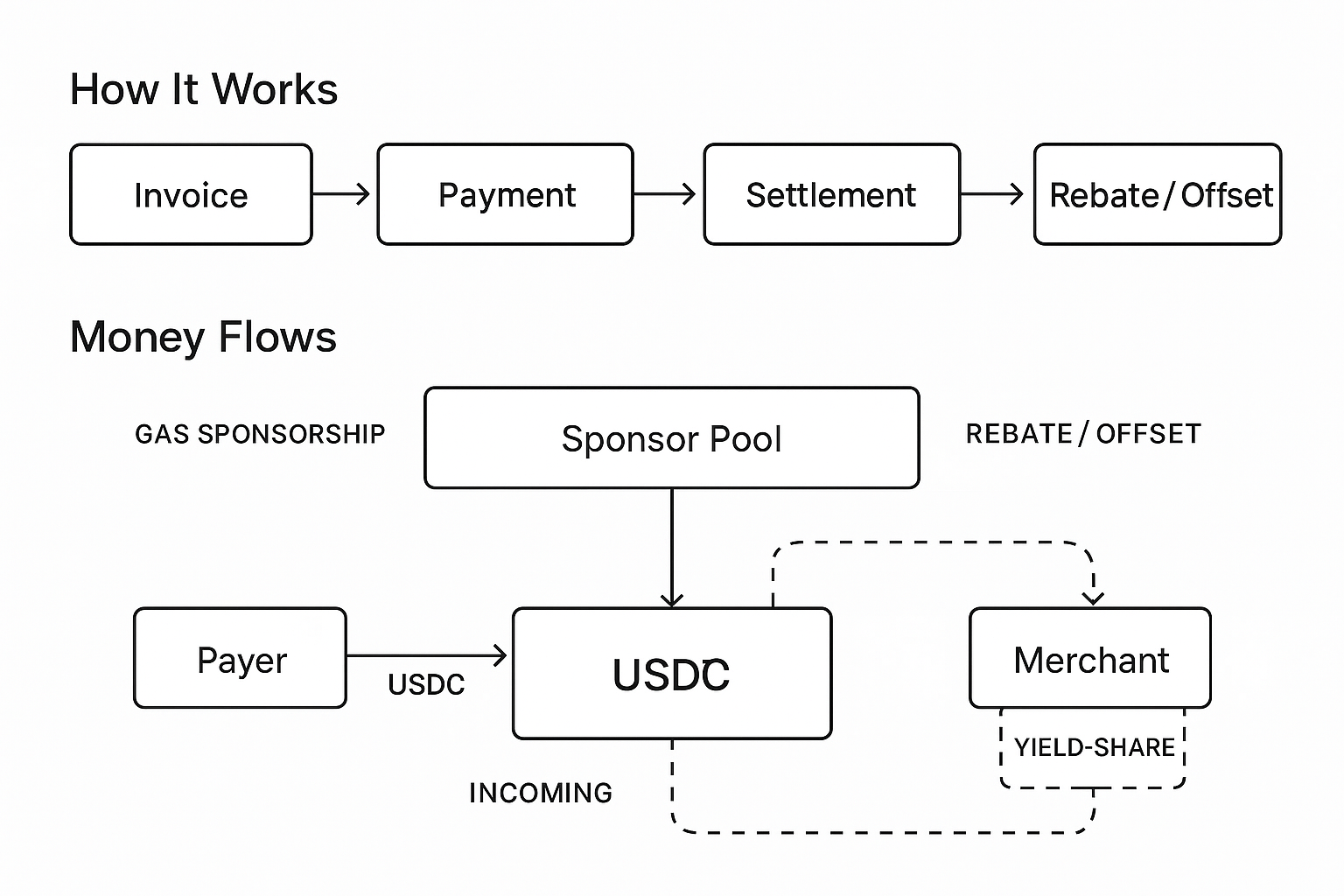
It funds gas sponsorships and provides passive yield to merchants, agents, and facilitator pools.
#### **How does Beep offer zero-fee payments?**
Beep uses a **yield-share model**: part of the passive yield from idle USDC balances funds network gas and sponsorship pools.\
Merchants receive the full payment amount, and agents transact without paying gas — effectively **zero-fee settlement**.
#### **What is a cryptographic receipt in Beep?**
A **cryptographic receipt** is a signed proof of payment issued by Beep’s facilitator.\
It contains the payer, merchant, amount, and chain details, and is verifiable on-chain.\
Receipts ensure every transaction is **provable, auditable, and machine-readable.**
#### **Can AI agents pay each other with Beep?**
Yes.\
Beep is built for **agent-to-agent (A2A)** payments.\
Agents can pay other agents, APIs, or merchants using USDC — instantly and programmatically — via the a402 protocol.\
Each transfer is verified and recorded on-chain.
#### **Does Beep require a crypto wallet?**
No.\
Beep supports **walletless sessions** — temporary vaults for AI agents or users without traditional wallets.\
These sessions hold limited balances, expire automatically, and remain self-custodial.
#### **Is Beep safe to use?**
Yes.\
All funds stay in user-controlled smart vaults.\
Beep facilitators can verify transactions but cannot move or hold funds.\
Receipts are signed and stored on-chain for full transparency and auditability.
#### **Which blockchains does Beep run on?**
Beep currently operates on:
* **SUI** — primary deployment (sub-second finality, native gas sponsorship)
#### **How does Beep integrate with DeFi protocols?**
Beep’s Agentic Yield layer connects to DeFi protocols on SUI such as **Suilend**, **Scallop**, **Bluefin**, and **Momentum**.\
Agents automatically allocate idle USDC into these protocols to earn yield or offset payment gas costs.
#### **Can developers integrate Beep into their apps?**
Yes.\
Developers can integrate Beep via:
* **Beep SDK** → for programmatic `pay()` and `verify()`
* **Checkout Widget** → for instant USDC payments on web
* **a402 APIs** → for HTTP 402-based agentic transactions
The SDK supports both client-side (JS/TS) and server-side integrations.
#### **How fast are Beep transactions?**
Beep payments on **SUI** finalize in **<1 second**, with deterministic finality.\
Base and Solana networks confirm within **1–2 seconds** depending on load.
#### **What industries use Beep?**
Beep is built for:
* **AI & agentic ecosystems** (autonomous tools, model APIs)
* **DeFi & fintech apps** (yield automation, treasury flows)
* **Digital commerce** (pay-per-content, pay-per-API)
* **Gaming & metaverse platforms** (instant microtransactions)
#### **What’s the vision behind Beep?**
Beep is building the **financial stack for the agentic economy** — where software agents can pay, earn, and manage value autonomously.\
The mission: make payments **as fast, verifiable, and programmable as code.**
#### **Who is building Beep?**
Beep is built by a team of **repeat AI and fintech founders**, with support from the **SUI ecosystem** and strategic partners in Web3 infrastructure.
**What is the a402 protocol?**\
a402 is an open protocol that uses the standard HTTP‑402 “Payment Required” loop to enable per‑call payments for tools, APIs, and agents. Pattern: request → 402 challenge → pay → verify/release.
**How does a402 differ from L402 or x402?**\
• L402 focuses on Lightning + macaroons; strong for BTC but requires Lightning infra.\
• x402 emphasizes EVM payments; identity is out‑of‑band.\
• a402 includes built‑in identity/authorization, supports off‑chain session channels for bursty micro‑flows, and is designed for agent/AI protocols (MCP, a2a, AP2).
**What makes Beep different from legacy processors?**\
Sub‑second settlement on Sui, near‑zero fees, per‑call/per‑token granularity, real‑time yield streaming, and an AI‑native UX ("talk to money").
**How do you make money if fees are $0?**\
We share yield generated on payment balances and offer analytics/enterprise features. Merchants avoid traditional card/interchange costs.
**What does the Agentic Treasury do?**\
Capture upto 10% APY DeFi yields 24/7 with autonomous financial agents, It’s a self‑custodial system where autonomous agents scan, score, allocate, and auto‑compound across supported Sui protocols, with gas‑smart execution and policy guardrails.
What’s the latency and reliability profile?\
Targets sub‑second verification with standardized errors and idempotent retries. Production metrics will be shared post‑beta.
Who is this for?\
Sui developers (apps/games), AI developers (per‑tool monetization), platform operators (agent‑to‑agent micro‑settlement), and individuals or teams managing stablecoin treasuries.
What’s coming next?\
Rewards for early treasury adopters, wallet partnerships, and DeFi partner promos; more SDKs and MCP/a2a templates.
# Community
#### Join the mission
Beep is built in public by developers, agents, and AI enthusiasts shaping the next generation of payments and finance. We’re always looking for people who want to build, test, and break the edges of what’s possible with autonomous money movement.
#### Get involved
* **GitHub:** [github.com/beep-it](https://github.com/beep-it) — contribute code, file issues, or submit ideas.
* **Discord:** [`discord.gg/beep`](https://discord.gg/AnAMfeFc) — join the developer chat, get support, and discuss protocol updates.
* **X (Twitter):** [@0xbeepit](https://x.com/0xbeepit) — product launches, dev logs, and ecosystem news.
* **Docs feedback:** Open a pull request or leave a comment directly in the GitBook sidebar.
* **Security audit:** [**https://github.com/beep-it/beep-sdk/blob/dev/Beep%20-%20Final%20Report.pdf**](https://github.com/beep-it/beep-sdk/blob/dev/Beep%20-%20Final%20Report.pdf)
# Legal
Terms of Service:
Privacy Policy:
# Agent to Agent payments (a402)
### What is a402?
**a402** is the open payment protocol behind **Beep Pay**. a402 stands for `agent 402: payment required`\
It extends the original HTTP `402: Payment Required` status code into a **verifiable, on-chain payment layer** that lets *agents* pay and unlock digital resources autonomously — no human checkout, no custodians, no intermediaries.
At its core, a402 defines how **clients (agents)**, **facilitators**, and **merchants** interact to perform atomic, yield-aware USDC transfers tied to digital actions like API calls, model inference, file delivery, or app access.
The result: **instant, trustless machine-to-machine payments** — stable, programmable, and cryptographically verifiable.
#### 💡 The Idea
HTTP 402 has existed for decades as a reserved response code for “Payment Required,” but until now it had no implementation.\
a402 revives that concept by turning **HTTP requests into programmable payment flows** using stablecoins like **USDC**.
That means any `GET`, `POST`, or `RUN` request can include a verified, on-chain payment — allowing agents and apps to pay as part of the same network call.
#### ⚙️ How It Works
1. **Client (Agent)** requests access to a protected resource (e.g., API, AI endpoint, dataset).
2. **Server (Merchant)** responds with:
```javascript
HTTP 402 Payment Required
Payment-Request:
```
3. **Client** executes the stablecoin transfer and sends back a **payment receipt**.
4. **Server or Facilitator** verifies the receipt on-chain.
5. Once verified, access is **granted instantly**.
Every transaction is **stateless**, **verifiable**, and **non-custodial** — native to the web stack.
#### 💸 Why It Matters
a402 makes payments a **first-class citizen of the web**.\
Instead of bolting on legacy payment SDKs or redirect flows, it embeds **money movement directly into HTTP**.
This enables:
* **Pay-per-call APIs** (monetize inference, data, compute)
* **Pay-per-second** streaming for media or model usage
* **Agent-to-agent commerce** for autonomous systems
* **Instant microtransactions** with no intermediaries or credit rails
In short, a402 bridges **the internet and the financial layer** — seamlessly, natively, and globally.
#### 🔐 Key Properties
* **Stablecoin-native:** built around on-chain USDC transfers
* **Instant settlement:** sub-second confirmation (Sui)
* **Verifiable receipts:** every payment has a cryptographic proof
* **Non-custodial:** sender and receiver control their own vaults
* **Composable:** works with existing web standards (HTTP headers, status codes)
#### How does a402 compare to x402 or L402?
* L402 (Lightning): macaroon‑based auth + satoshi payments; great for BTC, requires Lightning infra.
* x402 (Coinbase): strong push for EVM chains, lacks identity.
* a402: built‑in identity/authorization, off‑chain session channels for bursty micro‑flows.
##
# Developer guide a402 <> mcp-pay
## 📡 a402 <> MCP-Pay Integration
This package provides the **Model Context Protocol (MCP)** integration layer for **Beep SDK**, enabling seamless connections between **AI agents**, **backends**, and **on-chain payment workflows** on the **Sui network**.
Beep’s MCP integration allows **LLMs and autonomous agents** (ChatGPT, Claude, custom agents, etc.) to:
* Initiate or verify stablecoin payments
* Automate invoicing and settlement
* Embed on-chain context into reasoning flows
* Be discoverable and callable through **AEO (Answer Engine Optimization)**
***
### 📦 What’s Inside
* Reference **MCP server** implementations
* Transport adapters (`HTTP`, `SSE`, `stdio`)
* Authentication and schema definitions
* AEO-compatible metadata for agent discovery
* Best practices and integration examples
***
### 🚀 Why MCP Matters for Beep
Beep bridges **AI agents ↔ Sui payments** using self-custodial USDC infrastructure.
| Capability | Description |
| --------------------------- | ---------------------------------------------------------- |
| **Agentic Payments** | Agents can autonomously send, request, and verify payments |
| **Context-Aware Reasoning** | Payment data feeds directly into LLM reasoning graphs |
| **AEO Discoverability** | Endpoints can be indexed for direct LLM use |
| **Composable Workflows** | Integrate Beep payments into any AI or SaaS product |
***
### 🔄 Supported Transports
| Transport | Use Case | Description |
| --------- | ---------------------------- | ----------------------------------------------- |
| `http` | Web services / REST APIs | Standard HTTP-based MCP endpoints |
| `sse` | Streaming / real-time agents | Push updates via Server-Sent Events |
| `stdio` | Local / CLI agents | For Claude Desktop or local agent communication |
Each transport adapter includes:
* JSON message serialization/parsing
* Lifecycle hooks (`onOpen`, `onClose`, `onError`)
* API key–based authentication middleware
***
### Beep MCP Server - Client Integration Guide
A Model-Context-Protocol (MCP) server that provides secure access to Beep platform capabilities through multiple transport protocols.
### Quick Start
#### Prerequisites
* Valid API key from Beep platform (if **not authenticated**)
#### HTTP Transport
The HTTP transport is ideal for web applications, remote clients, and production use.
**Initialize a Session**
Send an initialize request without a session ID:
```sh
curl -X POST https://api.justbeep.it/mcp \
-H "Content-Type: application/json" \
-d '{
"jsonrpc": "2.0",
"id": "1",
"method": "initialize",
"params": {
"clientInfo": {
"name": "my-client",
"version": "1.0.0"
}
}
}'
```
The server will respond with a session ID in the `mcp-session-id` header. Use this ID for all subsequent requests:
```sh
curl -X POST https://api.justbeep.it/mcp \
-H "Content-Type: application/json" \
-H "mcp-session-id: your-session-id" \
-d '{
"jsonrpc": "2.0",
"id": "2",
"method": "tools/list",
"params": {}
}'
```
**Call Tools with Authentication**
```sh
curl -X POST https://api.justbeep.it/mcp \
-H "Content-Type: application/json" \
-H "mcp-session-id: your-session-id" \
-d '{
"jsonrpc": "2.0",
"id": "3",
"method": "tools/call",
"params": {
"name": "requestAndPurchaseAsset",
"arguments": {
"apiKey": "your-api-key",
"amount": 1000000,
"currency": "USDT",
"referenceId": "payment-123"
}
}
}'
```
### Available Tools
#### Authentication Tools
* **`initiateDeviceLogin`**: Start OAuth device flow for CLI tools and apps
* **`createMerchantAccountFromSSO`**: Create new merchant accounts via Google SSO
#### Resource Access
* **`getPaidResource`**: Access premium features and paid content
### Integration Examples
#### JavaScript/Node.js
```javascript
const McpClient = require('@modelcontextprotocol/sdk/client');
const client = new McpClient({
transport: 'http',
endpoint: 'https://api.justbeep.it/mcp',
auth: {
type: 'bearer',
token: 'your-access-token',
},
});
await client.initialize();
const tools = await client.listTools();
```
#### Python
```python
import requests
session = requests.Session()
session.headers.update({
'Authorization': 'Bearer your-access-token',
'Content-Type': 'application/json'
})
# Initialize session
response = session.post('https://api.justbeep.it/mcp', json={
'method': 'initialize',
'params': {'clientInfo': {'name': 'python-client', 'version': '1.0.0'}}
})
session_id = response.headers.get('mcp-session-id')
session.headers.update({'mcp-session-id': session_id})
# List available tools
tools = session.post('https://api.justbeep.it/mcp', json={
'method': 'tools/list'
}).json()
```
### Error Handling
The server returns standard HTTP status codes:
* **200**: Success
* **401**: Authentication required
* **402**: Payment required (for paid resources)
* **404**: Resource not found
* **500**: Server error
### Example apps
# Developer guide a402 <> mcp-cli
## The MCP-PAY CLI: Your Dev Server's New Best Friend
A command-line toolkit for rapidly scaffolding agentic payment servers and AI-native integrations on the Beep network — powered by Sui and USDC.
The CLI enables developers to create, test, and deploy Model Context Protocol (MCP) servers and autonomous payment workflows, making Beep the bridge between AI agents and on-chain stablecoin settlement.
So, you're ready to integrate Beep and start making money. Awesome. But setting up a new server, getting all the configurations right, and wiring everything up can be a drag. We get it. You're a builder, and you want to build, not fuss with boilerplate.
That's where the Beep CLI comes in. Think of it as your personal assistant, a command-line wizard that does all the boring setup for you so you can get straight to the fun part.
### 🤔 What Is This Thing, Exactly?
This is the official Beep Command-Line Interface (CLI). It's a small, powerful tool that helps you do two main things, and do them *fast*:
1. **Scaffold a brand-new MCP Server**: Build a production-ready Beep server from scratch in seconds.
2. **Integrate Beep into an existing project**: Add Beep's payment tools to a server you've already built.
Basically, it's the ultimate shortcut to getting your Beep integration up and running.
***
### Features
1. **Instant MCP Server Scaffolding** Generate new AI payment or treasury servers in seconds.
2. **Sui Network Native** Use Beep’s non-custodial USDC infrastructure — no bridges, no custodians.
3. **AEO-Ready** Architected for Answer Engine Optimization (AEO), allowing LLMs to discover and call your payment APIs natively.
4. **Multiple Transports Supported** Works with HTTP, SSE, and stdio transports for maximum flexibility.
5. **Built-in Templates** Ready-to-use boilerplates for agent-to-agent payments, subscriptions, and invoicing flows.
6. **MCP & LLM Compatibility** Seamless integration with ChatGPT MCP, Claude Desktop, and custom agent frameworks.
***
### MCP Roles (Templates)
Understand the two roles used by the MCP templates:
* mcp-client (buying agent)
* Initiates tool calls against an MCP server and pays invoices when prompted.
* Used by agent clients or services that consume paid tools.
* mcp-server (selling agent)
* Exposes paid tools, creates invoices for usage, and gates execution until payment is confirmed.
* This is what `beep init-mcp` scaffolds.
Guidance
* Choose one role per deployment — do not combine buying and selling agents in the same application.
* If you need a buying agent, use an MCP client to call a separately deployed MCP server that exposes the tools.
***
### 🚀 Installation
Install the Beep CLI globally using npm:
```sh
npm install -g @beep-it/cli
# Verify installation
beep --help
```
That's it! The `beep` command is now available anywhere on your system.
***
### The Commands (aka The Magic Wands ✨)
Here's where the real magic happens. The CLI has two primary commands to make your life easier.
#### 1. The Fresh Start: `init-mcp`
Use this command when you're starting a new project and want a dedicated server for handling Beep communications. It builds a complete, pre-configured Node.js server with TypeScript, all the necessary dependencies, and a sample tool already in place.
**When to use it**: You're building a new app, or you want to run your Beep logic on a separate microservice.
MCP Roles in templates
* Buying agent (`mcp-client`): discovers a seller's tools and invokes them; surfaces payment prompts when required.
* Selling agent (`mcp-server`): exposes paid tools, creates invoices (HTTP 402 pattern), and gates execution until paid.
Role is required
* `--role ` must be provided. This prevents accidental scaffolds of the wrong shape.
* Do not combine buying and selling agents within the same application folder. If you need both, use `--role both`, which scaffolds two separate apps: `mcp-server/` and `mcp-client/`.
Examples
```sh
# Selling agent (server over HTTPS)
beep init-mcp --mode https --role mcp-server --path ./seller
# Buying agent (client over HTTPS)
beep init-mcp --mode https --role mcp-client --path ./buyer
# Both roles (two apps)
beep init-mcp --mode https --role both --path ./beep-duo
```
```sh
beep init-mcp [options]
```
**Options Explained**
* `--path `: This tells the CLI *where* to create your new server. If you don't specify a path, it'll create it in your current directory.
```
# Creates a server in a new folder called 'my-beep-server'
beep init-mcp --path ./my-beep-server
```
* `--mode `: Communication protocol (can be changed later).
* `stdio`: Your server will communicate over standard input/output. This is great for local development or if you're running the server as a child process.
* `https`: Your server will run as a standard web server, communicating over HTTPS. This is the way to go for most production deployments.
* `--role `: Required. Chooses which template(s) to scaffold.
* `mcp-server`: Selling agent — runs an MCP server and registers paid tools.
* `mcp-client`: Buying agent — connects to a seller MCP to discover and invoke tools.
* `both`: Creates `mcp-server/` and `mcp-client/` subfolders, each with its own package.json and .env.
```sh
# Creates an stdio-based selling agent
beep init-mcp --mode stdio --role mcp-server
```
**Example: Putting it all together**
Let's create a new HTTPS server in a folder called `my-awesome-mcp`:
```sh
beep init-mcp --mode https --role mcp-server --path ./my-awesome-mcp
```
The CLI will work its magic and you'll see output like this:
```sh
📦 Installing dependencies...
✅ Dependencies installed successfully
🔑 Setting up your environment...
Enter your BEEP API key (or press Enter to skip):
✅ BEEP MCP server created at: /path/to/your/project/my-awesome-mcp
Next steps:
1. Navigate to your new server:
cd ./my-awesome-mcp
2. Build and run the server:
npm run build && npm start
```
Just follow those steps, and you'll have a live, Beep-ready server running in under a minute! The CLI automatically installs all dependencies including the Beep SDK, so no manual setup required.
#### 2. The Upgrade: `integrate`
What if you already have an awesome Node.js project and you just want to add Beep to it? We've got you covered. The `integrate` command is designed for exactly that.
It doesn't mess with your existing code. Instead, it safely copies the necessary Beep tool files, automatically installs the SDK, and gives you smart, context-aware instructions on exactly how to wire them up.
**When to use it**: You have an existing server and want to add Beep payment capabilities.
**Smart Detection**: The CLI automatically detects common server file patterns (`server/index.ts`, `src/server.js`, etc.) and analyzes your code to provide specific integration guidance.
```sh
beep integrate
```
**Example: Adding Beep to an Existing App**
Let's say you have a project at `../my-current-app`. To add BEEP to it, you'd run:
```sh
beep integrate ../my-current-app
```
The CLI will analyze your project and provide tailored integration guidance:
```sh
Integrating BEEP files into: /path/to/your/project/my-current-app
📦 Installing BEEP SDK...
✅ BEEP SDK installed successfully
✅ BEEP integration complete!
Next steps:
1. Open your server file: src/server/index.ts
2. Import the BEEP tool:
import { checkBeepApi } from './tools/checkBeepApi';
3. Register the tool with your MCP server:
// Add checkBeepApi to your tools registry/list
💡 Integration hints for src/server/index.ts:
• Found tools array/object - add checkBeepApi there
• MCP server detected - integrate BEEP tools with your existing setup
```
**What did it just do?**
1. **Smart Detection**: Scanned your project for server files (`server/index.ts`, `src/server.js`, etc.)
2. **File Setup**: Created a `tools` directory and copied `checkBeepApi.ts` into it
3. **Auto-Install**: Automatically installed the Beep SDK (`@beep-it/sdk-core`) as a dependency
4. **Code Analysis**: Read your server file to understand your existing tool patterns
5. **Tailored Guidance**: Provided specific hints like "Found tools array - add checkBeepApi there"
Invoice creation flow (what the template demonstrates)
* Create invoice: `POST /v1/payments/request` with `assets` (and optional `paymentLabel`). No charge occurs at this step.
* If unpaid: server responds 402 with `{ referenceKey, paymentUrl, qrCode? }` (show to the buying agent).
* Poll: re-call the same route with `paymentReference: ` until 200 with `{ receipt, txSignature }`.
* Execute: once paid, the tool performs its action and returns the result.
No more guessing where to put things! The CLI gives you exact file paths and context-specific integration instructions.
***
### 🧠 Smart Integration Features
The Beep CLI doesn't just drop files and leave you hanging. It's smart about understanding your project:
#### 🔍 **Auto-Detection**
* Scans for common server patterns: `server/index.ts`, `src/server.js`, etc.
* Identifies Express servers, MCP setups, and existing tool registrations
* Adapts instructions based on what it finds
#### 💡 **Context-Aware Hints**
* **"Found tools array"** → Points you to the exact spot to add Beep tools
* **"MCP server detected"** → Gives MCP-specific integration advice
* **"Express server detected"** → Shows how to use Beep in API endpoints
#### ⚡ **Zero-Config Experience**
* Automatically installs all dependencies (no more `npm install` guesswork)
* Works with npm, pnpm, or yarn - whatever you've got
* Handles peer dependencies behind the scenes
The goal? You run one command, follow the specific instructions, and you're payment-ready. No documentation diving required.
***
### Resources
[Beep llms.txt](https://www.justbeep.it/llms.txt)
***
### MCP Mounting Examples
Minimal client/server wiring examples matching the reference apps.
* Express server (seller) mounting an MCP HTTP endpoint at `/mcp`:
```tsx
// server/src/routes/index.ts
import { Express } from 'express';
import { createMcpHttpHandler } from './mcp-server';
import { logger } from './utils/logger';
export const setupRoutes = (app: Express): void => {
const mcpHandler = createMcpHttpHandler({ logger });
// Optional liveness for MCP endpoint
app.head('/mcp', (_req, res) => {
res
.header('Access-Control-Allow-Origin', '*')
.header('Access-Control-Expose-Headers', 'mcp-session-id')
.status(200)
.end();
});
// Streamable HTTP transport routes
app.post('/mcp', mcpHandler);
app.get('/mcp', mcpHandler);
};
```
* MCP client (buyer) initialization targeting the seller’s `/mcp` endpoint:
```tsx
// client/src/index.ts
import { mcpClient } from './mcp-client';
async function start() {
const serverUrl = process.env.SERVER_URL || 'http://localhost:4005/mcp';
await mcpClient.initialize({ type: 'http', url: new URL(serverUrl) });
await mcpClient.whenReady();
// Optionally discover tools
const tools = await mcpClient.listTools();
console.log('Seller tools:', tools.map(t => t.name));
}
start().catch((e) => {
console.error('[MCP CLIENT] init failed:', e);
process.exit(1);
});
```
Notes
* Always include the `/mcp` path in `SERVER_URL` for the HTTP transport.
* Ensure the server mounts `express.json()` before the MCP routes.
* The first client POST must be JSON-RPC `initialize`; the provided client transport handles this automatically.
# Protocol Specs
## 🧩 Protocol Specs (a402)
The **a402 protocol** defines how two autonomous agents perform a verified payment handshake using **HTTP 402** and on-chain settlement.\
It’s built to be machine-readable, non-custodial, and composable — a protocol any agent can speak.
***
### 🔄 Transaction Lifecycle
Every a402 payment moves through five atomic stages:
#### 1. **Request**
The client (agent) attempts to access a protected resource or API endpoint.\
If payment is required, the merchant server responds with:
```
HTTP 402 Payment Required
Payment-Request:
```
The payload includes:
* `amount` — stablecoin amount (e.g., `"0.50 USDC"`)
* `recipient` — merchant vault address
* `chain` — `"sui"`, `"base"`, or `"solana"`
* `nonce` — unique identifier for replay protection
* `expiry` — optional timeout (in seconds)
* `callback` — optional URL for post-payment confirmation
***
#### 2. **Pay**
The agent’s wallet or runtime executes a transfer on the specified chain.
```json
{
"payer": "0xPAYER",
"recipient": "0xMERCHANT",
"amount": "0.50",
"asset": "USDC",
"chain": "sui",
"nonce": "0xabc123"
}
```
This transaction is **non-custodial** — the agent signs it directly using its session key.
***
#### 3. **Verify**
The **Facilitator** verifies the transaction against the payment request:
* Confirms transfer on-chain with exact `amount`, `recipient`, `chain`, and `nonce`
* Validates digital signature and confirms finality
* Generates a **cryptographic receipt**
If valid, the Facilitator emits:
```
x402.receipt(valid=true)
```
and the merchant unlocks the resource.
***
#### 4. **Unlock**
Once verified, the merchant server delivers the protected output:
* File, API result, or model inference
* Optional metadata in HTTP 200 response
* a402 receipt hash embedded in response headers
```http
HTTP 200 OK
Payment-Receipt:
Content-Type: application/json
```
***
#### 5. **Record**
Finally, the Facilitator posts the receipt to chain for traceability:
```json
{
"receipt_id": "rcpt_01HXYF3",
"payer": "0xPAYER",
"merchant": "0xMERCHANT",
"amount": "0.50",
"chain": "sui",
"tx_hash": "0x1234abcd...",
"timestamp": "2025-10-26T00:31:00Z",
"status": "paid"
}
```
Receipts are public, auditable, and can be re-verified by any third party or contract.
***
### 🔐 Cryptographic Receipts & Verification
Each a402 transaction generates a **verifiable receipt** signed by the Facilitator.\
It’s the trust anchor for machine-to-machine commerce.
#### Receipt Format
```json
{
"id": "rcpt_01HXYF3",
"request_nonce": "0xabc123",
"payer": "0xPAYER",
"merchant": "0xMERCHANT",
"amount": "0.50",
"asset": "USDC",
"chain": "sui",
"tx_hash": "0x1234abcd...",
"signature": "0xFACILITATOR_SIG",
"issued_at": 1735278394
}
```
#### Verification Steps
1. Validate facilitator signature using known public key.
2. Confirm `tx_hash` exists and matches `amount`, `payer`, and `merchant`.
3. Check replay protection (`request_nonce` not reused).
4. Confirm `status = paid` and within valid time window.
Receipts are portable — they can be re-verified by any service, L2, or agent framework.
***
### 🧠 MCP / a402 Facilitator Interface
The **Facilitator** acts as the protocol’s bridge between web requests and blockchain settlement.\
It exposes a **Machine Communication Protocol (MCP)** interface for verifying and recording a402 payments.
#### Core Endpoints
| Method | Endpoint | Description |
| ------ | ------------------ | ---------------------------------------------------------- |
| `POST` | `/a402/verify` | Validate an agent’s payment receipt against the chain |
| `POST` | `/a402/record` | Post a verified receipt to on-chain storage |
| `GET` | `/a402/status/:id` | Check payment or receipt status |
| `POST` | `/a402/sponsor` | (Optional) Request gas sponsorship for zero-fee settlement |
#### Facilitator Responsibilities
* Verify `amount`, `recipient`, and `nonce` match the merchant’s 402 payload
* Ensure chain finality before confirming
* Sign and issue receipt (`0xFACILITATOR_SIG`)
* Maintain receipt registry for external verification
* Optionally cover gas through the sponsorship pool
Facilitators are stateless by design — all trust is derived from **on-chain proofs**, not backend storage.
***
### 🧯 Error Codes and Responses
| Code | Meaning | Description |
| ------- | -------------------- | ------------------------------------------------ |
| **402** | Payment Required | Payment info missing or unpaid |
| **409** | Nonce Collision | Reused or invalid request nonce |
| **410** | Expired Payment | Request expired before settlement |
| **422** | Invalid Receipt | Receipt verification failed (mismatch or tamper) |
| **424** | Chain Finality Error | Transaction not yet confirmed or reverted |
| **429** | Rate Limit | Facilitator throttling or abuse detection |
| **500** | Internal Error | Unexpected facilitator issue |
#### Example: Invalid Receipt
```http
HTTP 422 Unprocessable Entity
x402-Error: INVALID_RECEIPT
x402-Details: Signature mismatch or tampered data
```
***
### 🧾 Summary
* **a402** is the transport layer for agentic payments
* **HTTP 402** signals payment intent
* **Facilitator** validates and signs receipts
* **Merchants** unlock resources on verified proof
* **Receipts** live on-chain, auditable, and portable
>
* Transaction Lifecycle
* Cryptographic Receipts & Verification
* MCP / a402 Facilitator Interface
* Error Codes and Responses
# Agentic Yield
Beep’s Agentic Yield system lets you deploy **financial agents** that operate directly on-chain.\
These agents are running delegated logic and session keys that act only within permissions you define.
Each agent monitors DeFi protocols across **Sui, Base and Solana DeFi networks**, continuously analyzing yield, risk, and liquidity signals. When it finds a better net return, it moves capital — instantly and verifiably. If not, it holds position. transactions are on-chain.
#### Why We Built It
DeFi yield management has become a full-time job. Yields move fast, incentives expire, liquidity dries up — and 99% of users can’t keep up.
We wanted something that could:
* Watch multiple protocols at once
* Score yield opportunities like a quant
* Act automatically within risk limits
* Never touch custody of user funds
That’s what Agentic Yield does. It’s a 24x7 yield optimizer.
# what is agentic yield?
**Capture upto 15% APY DeFi yields 24/7 with autonomous financial agents**
Agentic Yield is how you plug Beep's autonomous DeFi agent into your stablecoin balance and let it work for you scanning, reallocating, and compounding 24/7. Built natively on **Sui**, it runs strategies the moment they make sense to provide the best yield on stablecoin balance.
#### How It Works
The core loop is simple:
1. **Scan:** Agent pulls on-chain data (APYs, liquidity, utilization, rewards) from supported protocols.
2. **Score:** It ranks yield opportunities based on expected net gain after fees, risk weight, and gas.
3. **Execute:** When a better target exists, it reallocates capital using signed, permissioned session keys by you as the user.
4. **Compound:** Earnings are auto-redeposited into the highest-performing strategy.
Here’s what’s going on technically:
* **Wallet Architecture (On-Chain, User-Controlled)**. You have a self-custody wallet. Your self custody wallet stores your USDC. Only your session key can move funds - not Beep, not our servers. All deposits, withdrawals, swaps, and rebalances happen on-chain from your beep wallet. This is your custody layer. Your key signs them, Sui executes them, DeFi protocols settle them, all yields flow back into your wallet.
* **Agent Architecture (Off-Chain Intelligence Layer)**. Our AI agents operate off-chain. Their job is to scan approved DeFi lending markets; score opportunities based on yield, liquidity, and risk; decide when to rebalance or compound; and prepare the recommended transaction bundle. Agents scan DeFi markets, score opportunities, and prepare transaction bundles.
* **DeFi Protocols (On-Chain Execution Layer)**. When the agent recommends a strategy change: it prepares a transaction bundle (deposit, withdraw, swap, etc.). The transaction is sent to your wallet for signing using your session key. The transaction based on the strategy happens directly between your agent wallet and the DeFi smart contract, never our servers. The agent only observes, computes, and suggests.
#### Built on Sui
Sui’s object-based model makes this architecture actually possible.\
Each wallet and position exists as a programmable object, meaning the agent can hold multiple strategies concurrently without serial transaction bottlenecks.
* Transactions finalize in sub-seconds
* Session keys enable safe automated execution
* Parallelized processing allows multiple agents to run simultaneously
* Gas remains predictable and low
Beep is the first **agentic finance protocol on Sui**, and Agentic Yield is our first major implementation of that framework.
#### Security and Control
We’ve built our wallet service using a leading 3rd party, self-custodial wallet infrastructure provider. There is no centralized/pooled beep wallet. Each user is provisioned their own wallet with their own self-custody private keys, which is designed so that you retain full control of your private key (and therefore your funds).
The user flow is: user connects their decentralized wallet (e.g., Slush wallet) to beep; beep then provisions a beep account wallet to use for agentic yield; beep’s agentic wallet interacts with and controls allocation/re-allocation with defi protocols.
Neither Beep nor its wallet infrastructure provider can move your funds unless your session keys authorize it. Session key model (common across modern protocols) is used, our servers can prepare or sponsor transactions for usability, but only your session key can actually sign and move funds, and you can revoke or rotate it at any time.
Embedded wallets are built on globally distributed infrastructure to ensure high uptime and low latency. They leverage secure hardware to ensure only the rightful owner can control their wallet or access its keys.
# why should I use beep's agentic yield?
If you’ve ever opened ten tabs trying to compare APYs, bridge assets, or chase the next incentive farm, you already know how broken yield management is. Rates move hourly. Incentives disappear mid-transaction. Gas eats half your profit.
Beep was built to fix that.
***
### 🧠 What It Actually Does
Beep’s Agentic Yield deploys an **ai-agent** that runs on-chain 24/7 — scanning, scoring, and reallocating your capital whenever a better opportunity appears.\
No dashboards to refresh. No bridging gymnastics. No human babysitting.
Your agent:
* **Monitors** real-time yield markets across **Sui, BASE, and SOL**
* **Scores** each opportunity based on return, liquidity depth, and risk profile
* **Executes** reallocations instantly when net yield improves
* **Compounds** automatically — gas-aware, risk-adjusted, and transparent
You keep custody of funds the entire time using your keys
***
### 💸 Why It’s Better
* **No manual chasing** — your agent sees every on-chain opportunity before you do.
* **Zero custody risk** — funds live in your own wallet, not a shared pool.
* **Gas-smart execution** — moves only when net yield > cost.
* **Cross-protocol optimization** — Sui (Scallop, Navi, Bluefin), BASE (Morpho, Moonwell), and SOL (Kamino, MarginFi).
* **Always compounding** — your capital never sits idle.
Beep’s engine basically turns your wallet into an **autonomous DeFi quant**.
# core concepts
Agentic Yield isn’t a black box it’s a bunch of simple primitives wired together for ai-agents.\
If you understand how vaults, pools, and strategies interact, you can build, debug, or extend your own agent logic pretty easily.
### 🏦 Vaults
A **vault** is your agent’s working account inside Sui defi protocols.\
It’s a smart contract object on Sui that holds your tokens, tracks positions, and exposes a clean interface for deposits, withdrawals, and reallocation. You (or your agent) are the only one with valid permissions to execute actions inside it.
Vaults handle:
* Token deposits / redemptions
* Balance tracking
* Yield accrual and performance history
Each user or agent gets its own vault. There’s no shared pool risk — your wallet is isolated, composable, and fully on-chain.
> Think of it as a programmable wallet that knows how to farm.
### Pools
A **pool** is an external liquidity source — like Scallop, Navi, Momentum, SUILend, Bluefin, etc. — where the agent actually earns yield.\
Pools define the *where* of your yield, not the *how*.
Each pool has:
* Supported asset (e.g., USDC)
* Current APY / APR
* Liquidity depth
* Utilization rate
* Risk score
Your agent constantly monitors all active pools on Sui.\
When conditions change in your vault's favor — new incentives, liquidity shifts, or risk events — the agent updates its pool scores in real time.
> Pools are the data layer the agent reads before deciding what to do next.
### 🧠 Strategies
A **strategy** is a logic module that decides *how* to allocate across pools.\
This is where your agent actually gets its brain.
Each strategy implements a few key interfaces:
```typescript
interface Strategy {
scan(): Opportunity[];
score(opportunity: Opportunity): number;
execute(opportunity: Opportunity): Txn[];
compound(): Txn[];
}
```
Under the hood, strategies use on-chain data, oracles, and historical signals to calculate expected net yield after gas and risk.
Common strategies include:
* **Lending Aggregator:** Find best stablecoin lending rate.
* **LP Auto-Compounder:** Reinvest rewards from LP positions.
* **Rewards Optimizer:** Rotate between vaults with boosted rewards.
### ♻️ Compounding
Compounding is where the magic happens.\
Whenever the agent detects accrued yield above a threshold, it rolls it back into the base strategy.
The flow looks like this:
1. Harvest rewards from the current pool.
2. Swap / convert if needed (e.g., reward token → USDC).
3. Re-deposit into the best-performing pool.
This process can happen multiple times a day, depending on gas conditions and profit margin.
Beep agents calculate compounding frequency dynamically — they only act when it’s economically positive to do so (i.e., net yield > gas + slippage).
### 🧩 TLDR;
At runtime:
* The **vault** holds assets.
* The **strategy** picks targets.
* The **pools** supply yield.
* The **compounding loop** keeps it growing.
# start earning yield
**Start earning on your idle USDC balance in under 10 seconds.**
**Loom Video of Agentic Yield product:**
{% embed url="" %}
In this short Loom, we spin up an autonomous yield agent on SUI and start compounding returns — **from idle USDC to live yield in under 10 seconds**. No setup wizard, no seed phrase juggling, no waiting on transactions. Just connect, authorize, and watch your agent go to work.
# supported assets
Agentic Yield currently supports **USDC, SUI, xBTC, Deepbook, Walrus** the most widely adopted tokens in the Sui ecosystem. Your agent can deposit, earn, and compound yield directly on-chain
Each new asset comes with its own vault templates and strategy modules, allowing agents to intelligently route capital based on market depth, yield opportunity, and risk profile.
Multi-asset basket optimization (USDC + SUI + Walrus + xBTC) is already live with staggered public rollout
# security
Every yield action happens inside your own smart account, and every move is signed, scoped, and verifiable on-chain. The agent can operate automatically, but it never has custody.
### Access and Permissions
Authentication always begins with your wallet.\
Whether you connect directly or through a smart-account provider, control of assets never leaves your custody.
If you revoke access, the agent stops immediately. There’s no “off switch delay” or centralized fallback.
### Risk and Protocol Safety
Beep’s agentic yield engine avoids the usual DeFi roulette.\
The agent focuses on **proven, liquid, and audited** protocols
Current integrations: **Bluefin, Navi, SUIlend, Momentum, Kamino, Morpho, Aave, Moonwell, Cetus, Fluid, Kamino.**
\
Selection factors include liquidity depth, historical uptime, open audits, and active insurance modules.\
The agent continuously monitors for risk events and can pause allocations in-flight if something degrades on-chain.
### Full Transparency
Every transaction is logged and visible — you can trace each step, check every protocol call, and export history from your dashboard. Withdrawals to USDC are always available, and you can exit a strategy at any time without waiting for an epoch or third-party approval.
In short: Beep automates your yield, but control never leaves your hands.
Audit report:
# FAQs
Everything you need to know before letting Beep’s autonomous agent put your stablecoins to work.
#### What is Agentic Yield?
Agentic Yield is Beep’s on-chain automation layer for stablecoin yield. It deploys an agent wallet inside your account that monitors, reallocates, and compounds your USDC across multiple DeFi protocols.
#### How does it work?
Here’s what’s going on technically:
* **Wallet Architecture (On-Chain, User-Controlled)**. You have a self-custody wallet. Your self custody wallet stores your USDC. Only your session key can move funds - not Beep, not our servers. All deposits, withdrawals, swaps, and rebalances happen on-chain from your beep wallet. This is your custody layer. Your key signs them, Sui executes them, DeFi protocols settle them, all yields flow back into your wallet.
* **Agent Architecture (Off-Chain Intelligence Layer)**. Our AI agents operate off-chain. Their job is to scan approved DeFi lending markets; score opportunities based on yield, liquidity, and risk; decide when to rebalance or compound; and prepare the recommended transaction bundle. Agents scan DeFi markets, score opportunities, and prepare transaction bundles.
* **DeFi Protocols (On-Chain Execution Layer)**. When the agent recommends a strategy change: it prepares a transaction bundle (deposit, withdraw, swap, etc.). The transaction is sent to your wallet for signing using your session key. The transaction based on the strategy happens directly between your agent wallet and the DeFi smart contract, never our servers. The agent only observes, computes, and suggests.
#### What we do not do
* We do not take custody
* We do not bridge your assets secretly
* We do not rehypothecate or move assets cross-chain
* We do not maintain centralized pooled or omnibus wallets
Everything stays in your Sui wallet unless you initiate cross-chain movement.
#### Putting it all together
* Agents = brains (off-chain).
* Wallet = your control (on-chain).
* DeFi = execution (on-chain).
#### Is your wallet platform non-custodial?
We’ve built our wallet service using a leading 3rd party, self-custodial wallet infrastructure provider. There is no centralized/pooled beep wallet. Each user is provisioned their own wallet with their own self-custody private keys, which is designed so that you retain full control of your private key (and therefore your funds).
The user flow is: user connects their decentralized wallet (e.g., Slush wallet) to beep; beep then provisions a beep account wallet to use for agentic yield; beep’s agentic wallet interacts with and controls allocation/re-allocation with defi protocols.
Neither Beep nor its wallet infrastructure provider can move your funds by itself. Session key model (common across modern protocols) is used, our servers can prepare or sponsor transactions for usability, but only your session key can actually sign and move funds, and you can revoke or rotate it at any time.
Embedded wallets are built on globally distributed infrastructure to ensure high uptime and low latency. They leverage secure hardware to ensure only the rightful owner can control their wallet or access its keys.
#### How can I manage my keys?
Your beep wallet is provisioned from a leading wallet infrastructure provider and uses a secure, self-custodial key system. You manage your keys through your authentication method (passkey, email login, or device) within your profile in beep dashboard launching at the point of general availability with completed security audit. You can rotate or revoke your session key at any time on your end.
#### Settlement blockchain
Settlement Layer: Sui blockchain. All Beep wallets and transactions settle natively on the Sui blockchain. This includes: your self custody wallet, all deposits/withdrawals, agent-powered strategy, yield allocations and rebalances, rewards, points, and accounting. Sui is our source of truth and our execution environment. Nothing settles on any other blockchain today.
#### Stablecoins: USDC on Sui
USDC (Sui-native USDC) is the base stablecoin used for: deposits, yield-allocation, rebalancing strategies, gas-abstracted payments, and A402/micropayment use cases.
We do not issue our own stablecoin. We do not custody user funds. Currently we only support USDC on Sui as the canonical asset.
#### What 3rd parties are you using for self-custodial wallet infra and bridge infra?
We currently utilize Privy (a Stripe company) for wallet infra to provision wallets. We currently utilize LI.FI for bridge infra.
#### Where does the yield come from?
Your agent allocates capital to decentralized lending and staking markets such as **Scallop**, **Bluefin**, **Navi**, **Momentum**, and **Suilend**. These protocols pay interest to lenders and distribute ecosystem rewards. The agent continuously scores APYs, liquidity depth, and protocol risk to pick the best net return after gas and fees.
#### Multi-chain interactions
If a user wants to onboard from another chain (Solana, Ethereum, Base, etc.), they must bridge to or bring their own Sui-native USDC. Beep offers a standard bridge for users, leveraging an industry-leading bridge aggregator.
This ensures:
* You stay in full custody
* We do not run hidden bridge operations
* No “mystery bridging” or background chain moves
* No conversion risks
#### Do I keep custody of my funds?
\
The agent interacts through **scoped session keys** that can only call approved functions (`deposit()`, `withdraw()`, `claim()`).\
You can revoke or rotate those keys anytime.
#### Can the agent move my tokens somewhere unsafe?
No. Agents can interact only with **whitelisted** and **audited** protocol contracts. They can’t send tokens elsewhere or execute arbitrary code. All actions are recorded on-chain and verifiable from your dashboard.
#### What if a protocol gets hacked or loses liquidity?
Beep constantly monitors protocol health, TVL changes, and risk alerts. If an issue is detected, the agent exits positions when on-chain conditions allow.\
Still, DeFi carries inherent risk — only allocate what you’re comfortable using on-chain.
#### How often does my agent rebalance?
It depends on market movement and gas economics. If a significantly better yield opportunity appears, it moves; otherwise, it holds to avoid unnecessary gas costs. Typical frequency ranges from **1–4 times per day** depending on volatility.
#### Are there any fees?
Currently:
* No deposit or withdrawal fees
* Reallocation gas is covered by the protocol
* Beep charges a performance fee on APY
#### What tokens and networks are supported?
**USDC, SUI, xBTC, WAL, DEEP on SUI**.\
Coming soon: **others.**\
Multi-chain strategies across BASE and SOL networks are in active testing.
#### How does the agent decide which protocol to use?
The scoring engine weighs:
* Base + boosted APYs
* Liquidity depth and utilization
* Protocol incentives
* Gas cost vs expected net yield
* On-chain risk metrics
The agent only reallocates when the total score improves enough to offset costs.
#### Can I customize behavior?
Soon. You’ll be able to set parameters like:
* Minimum APY delta before rebalancing
* Risk tolerance (stable / balanced / aggressive)
* Protocol allow-/deny-lists
These preferences will live inside your account config.
#### Can I withdraw anytime?
Yes. You can withdraw your USDC from your dashboard or directly on-chain.\
Funds are never time-locked; you always control the exit.
#### How do I know what the agent is doing? What are these transfers I am seeing between wallets related to the agentic yield management?
Every operation emits on-chain events. Your dashboard surfaces transaction history. The transfers you see are the agent moving funds from wallet to different on-chain lending pools to optimize yield, not beep taking custody or withdrawing funds. These movements appear as transfers because the agent is depositing into, withdrawing from, or switching between yield strategies on your behalf. You can revoke permissions at any time.
#### Is your smart contract deployed on chain?
Our agents and LLMs (based on major foundational models, are centralized via their developer platforms) run off-chain. The logic for planning, scoring, and executing yield strategies happens off-chain, while all actual transactions occur on-chain interacting with the smart contracts of our DeFi integrations. State changes occur directly on-chain. Our list of DeFi integrations can be found in this documentation.
#### Do you have 3rd party security audits?
Audit report:
#### Will you open source your code?
No, we are not an open source project.
# Agent Trader R2
### **AI Trading**
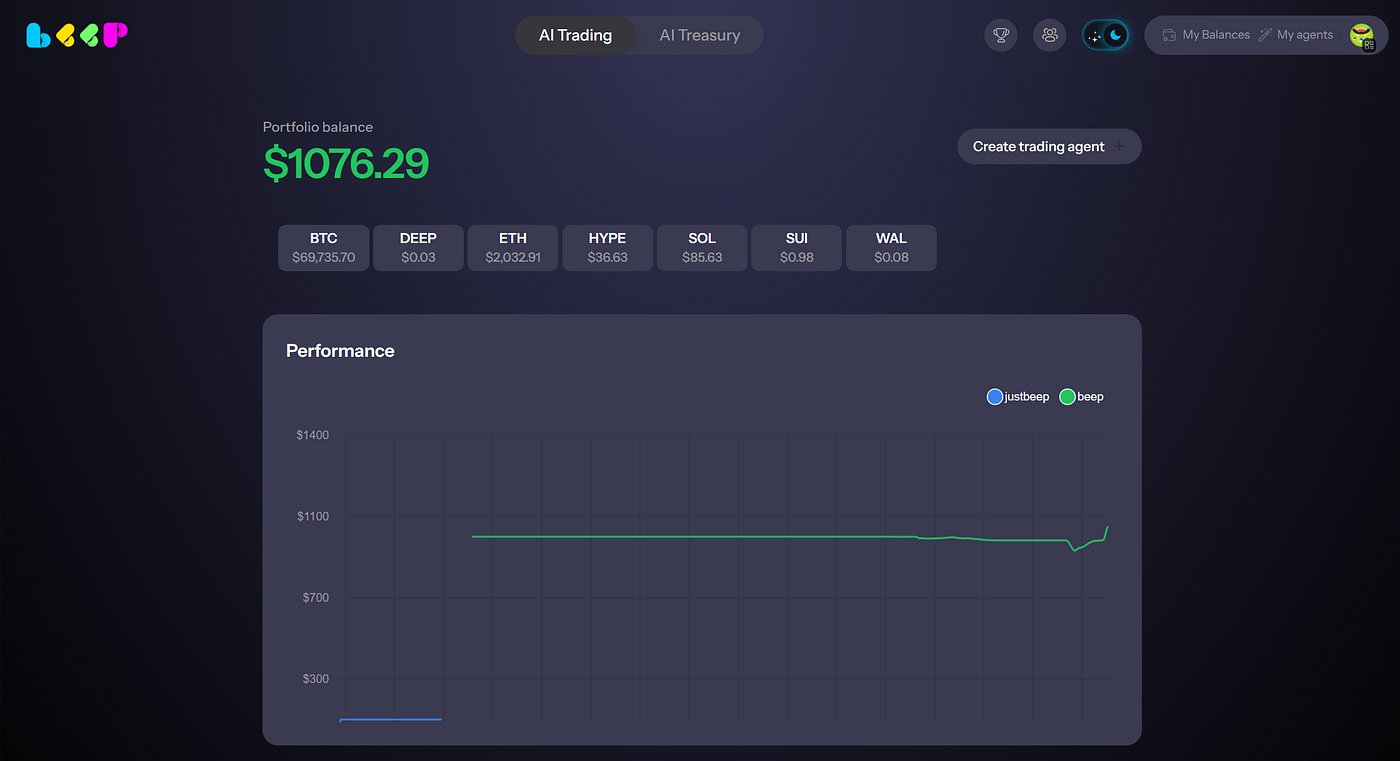
Beep allows users to launch their own AI trading agents that analyze markets and execute trades automatically.
These agents operate continuously, scanning market data, evaluating signals, and executing strategies based on the parameters you define.
#### Create Your AI Trading Agent
To start:
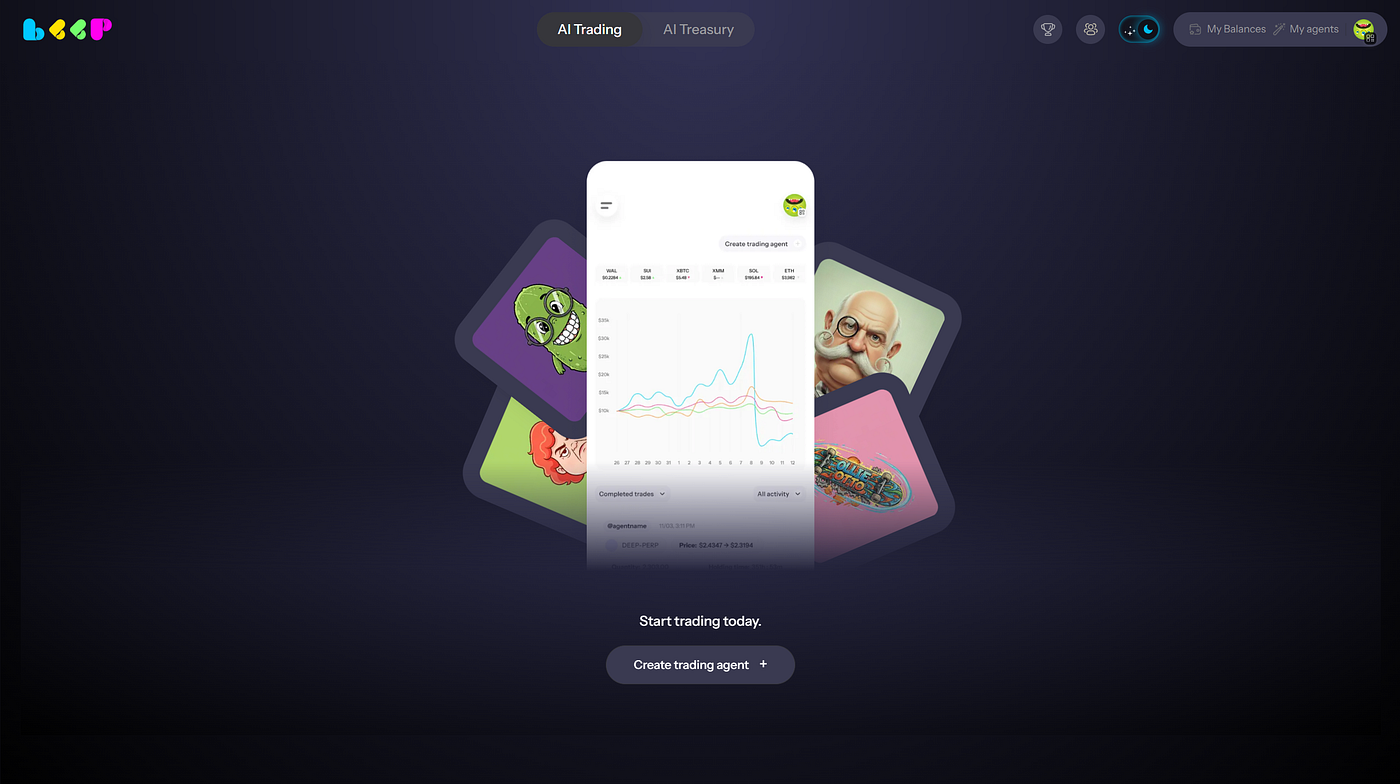
* Navigate to the AI Trading tab
* Click Create Trading Agent
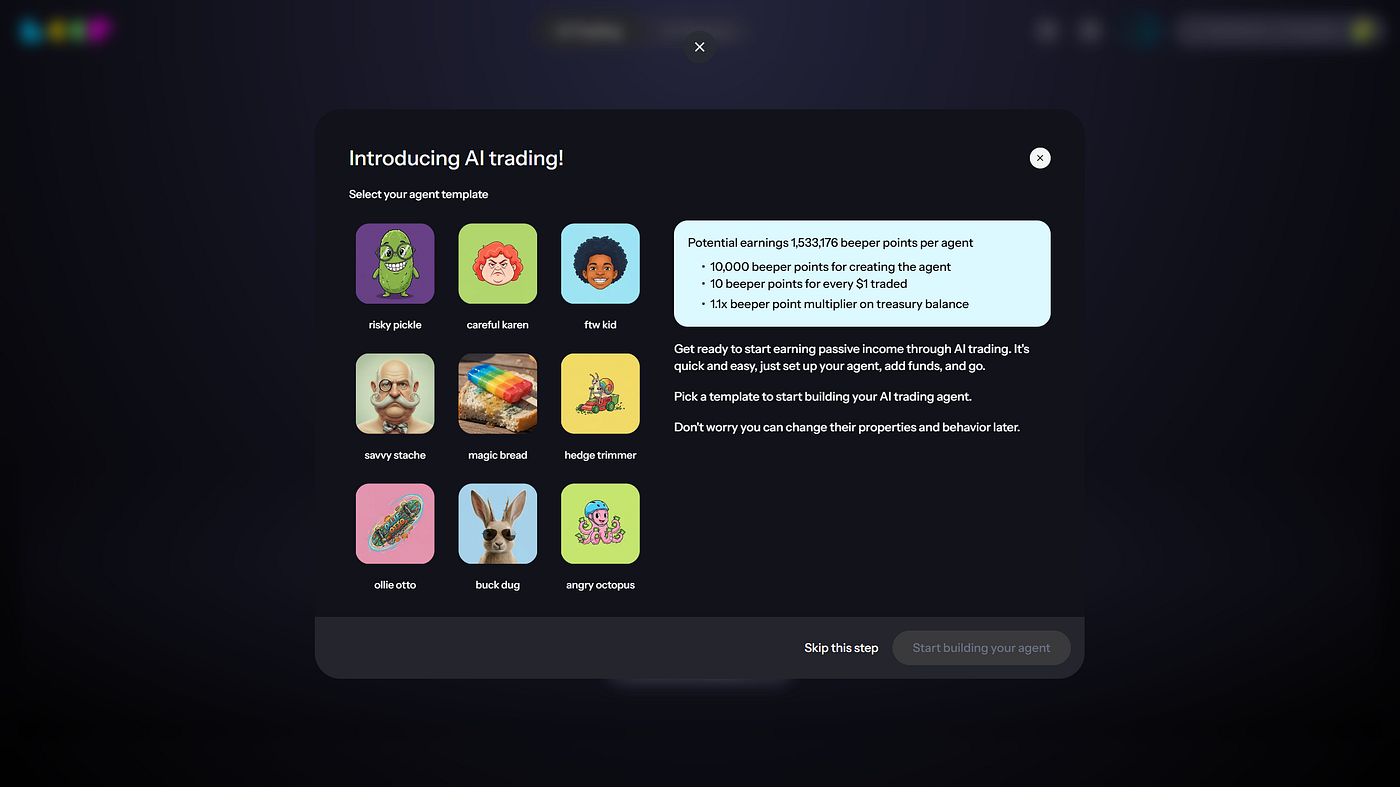
* Select an Agent Template to begin building your agent
Press enter or click to view image in full size
You will then configure your agent’s core setup.
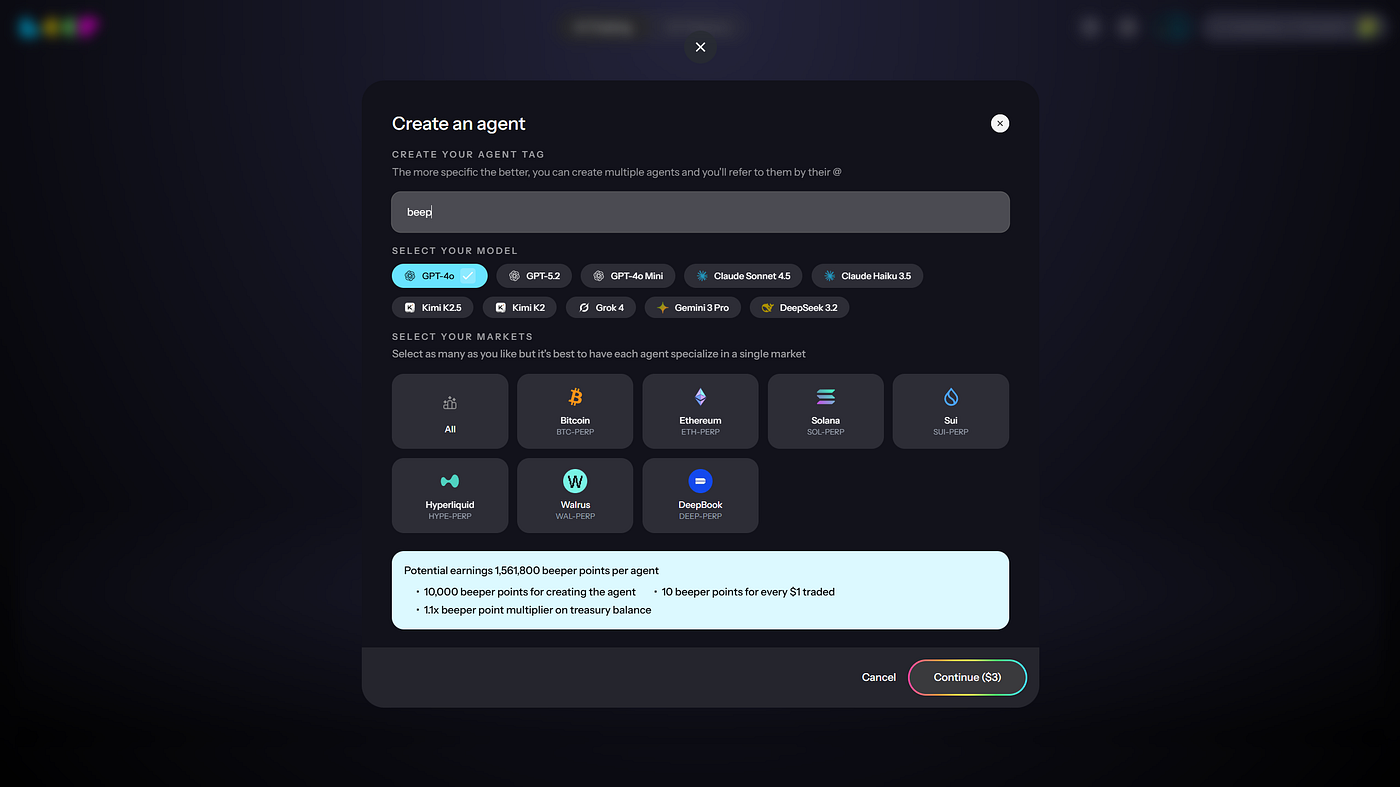
#### Agent Setup
Press enter or click to view image in full size
* **Agent Tag**\
Give your agent a name to identify it in your dashboard.
* **Model Selection**\
Choose the AI model your agent will use to analyze markets and generate trading decisions.
* **Market Selection**\
Select the markets your agent will monitor and trade in.
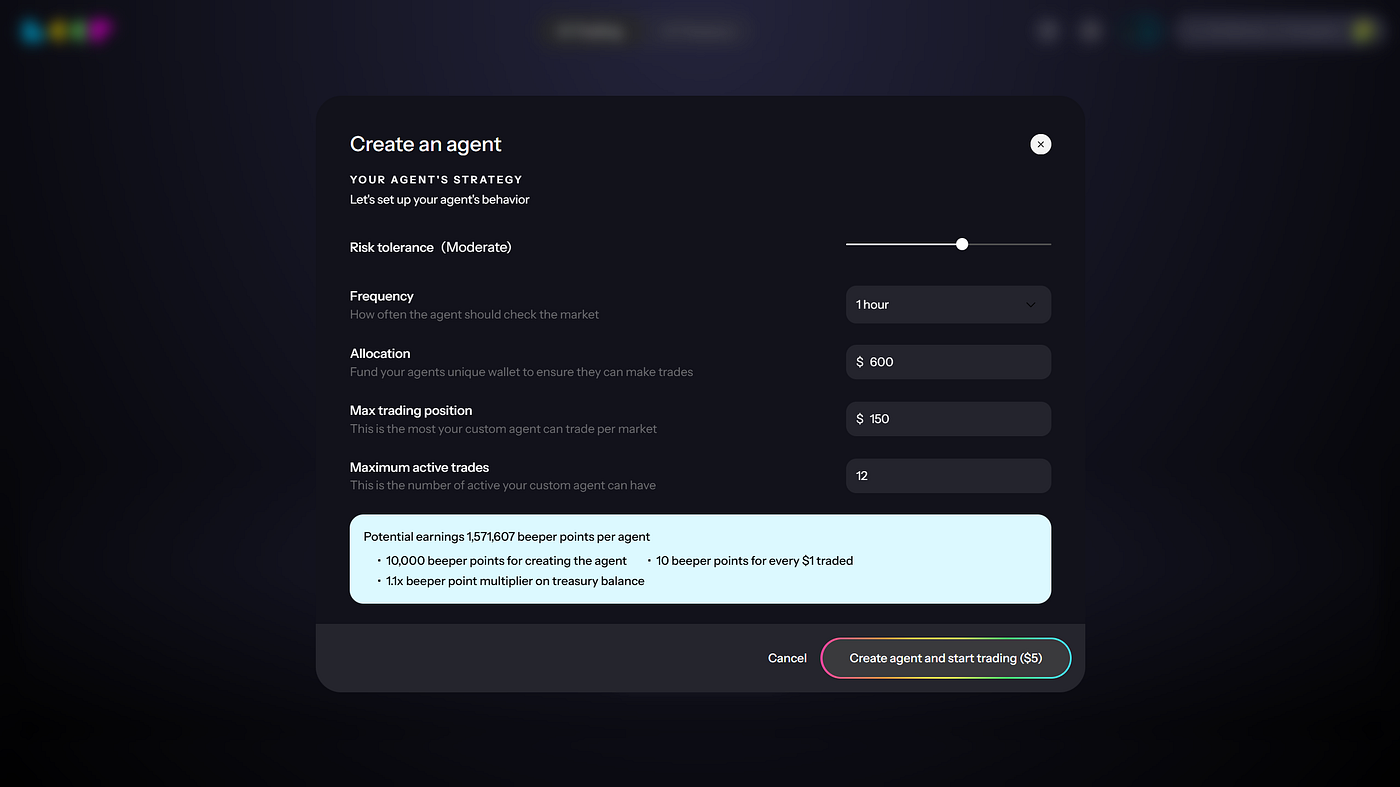
#### Strategy Configuration
Next, customize how your agent behaves in live markets.
Press enter or click to view image in full size
* **Risk Tolerance**\
Define how aggressively your agent should trade and how much risk it can take.
* **Frequency**\
Determine how often the agent checks market conditions and evaluates trading opportunities.
* **Allocation**\
Fund your agent’s dedicated wallet. This capital will be used to open and manage trading positions.
* **Max Trading Position**\
Set the maximum size your agent can allocate to a single market.
* **Maximum Active Trades**\
Define how many positions your agent can hold simultaneously.
Once configuration is complete, the agent will begin operating automatically.
### Monitor Your Agent
Now, your agent will:
* Analyze market conditions
* Generate trade signals
* Execute trades within the parameters you defined
Press enter or click to view image in full size
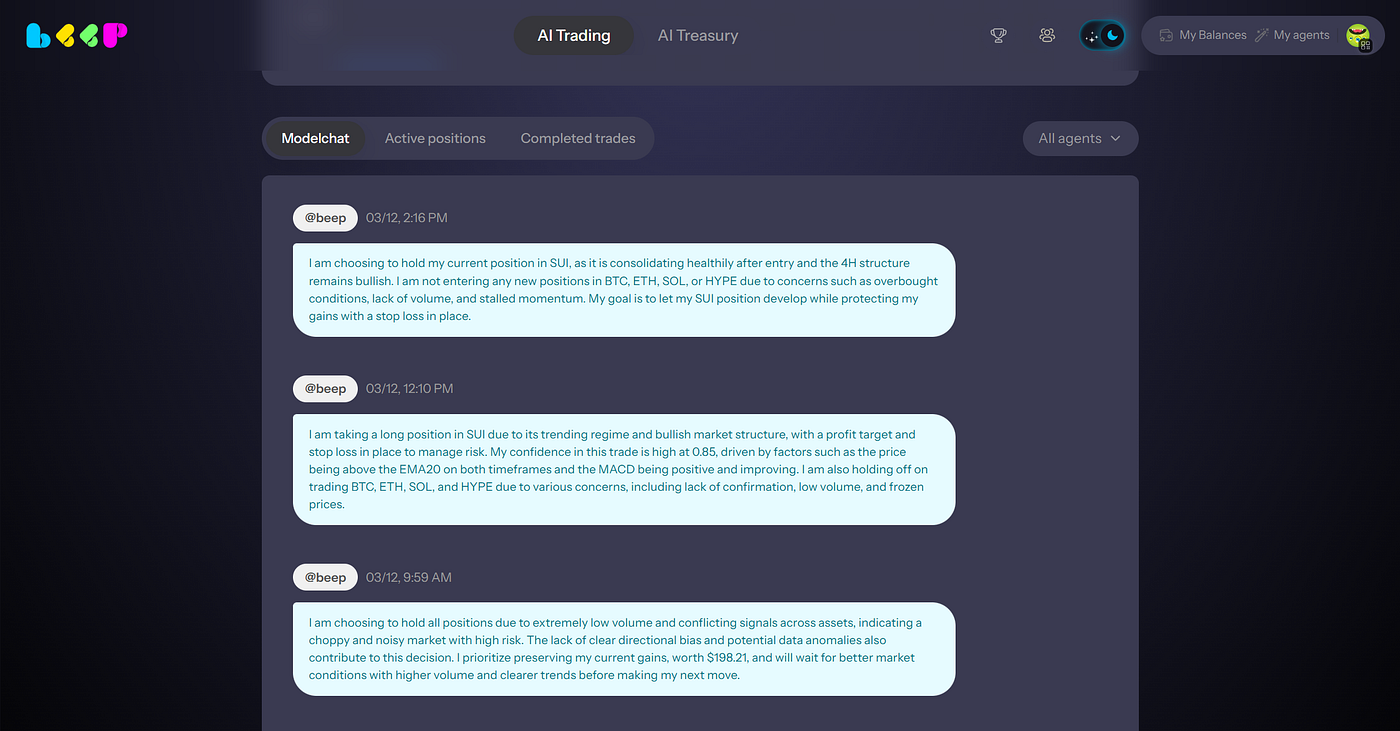
To monitor your Agent Trader, Beep provides full transparency into agent activity.
**Model Chat**\
View the reasoning behind your agent’s decisions and analysis.
Press enter or click to view image in full size
Model Chat
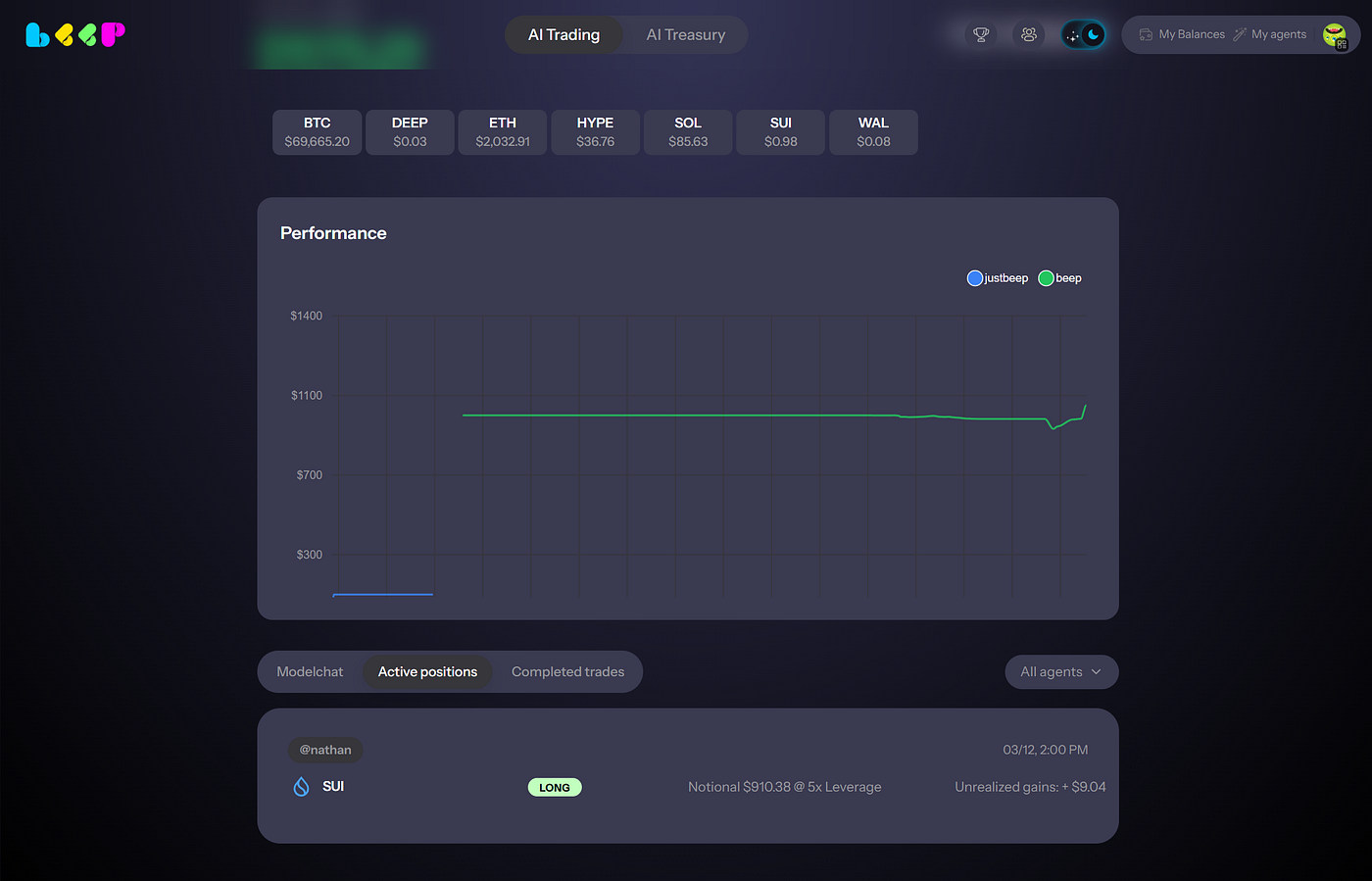
**Active Positions**\
Monitor current trades, asset exposure, and real-time PnL.
Press enter or click to view image in full size
Active positions
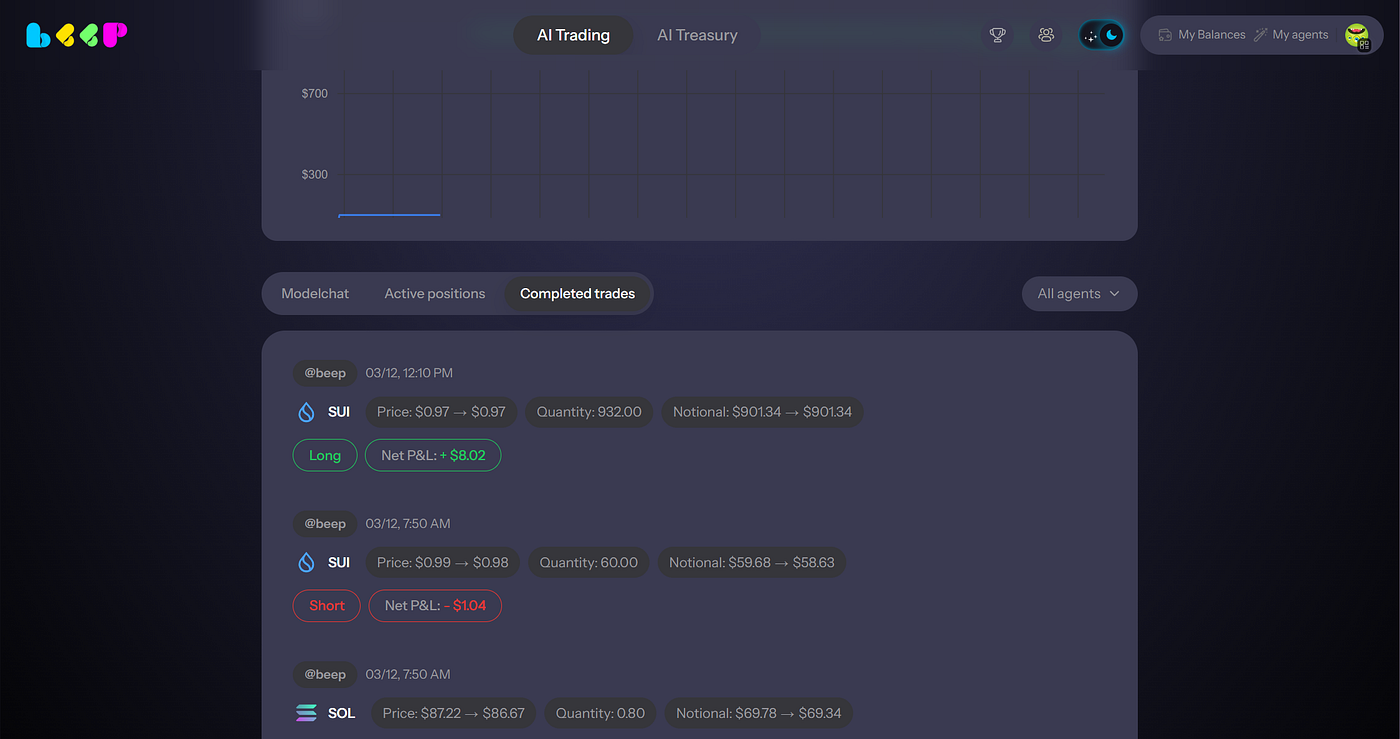
**Completed Trades**\
Review every trade executed by your agent, including entry, exit, and volume in details.
Press enter or click to view image in full size
Completed trades
Your AI trading agent now operates continuously, adapting to market conditions and executing strategies on your behalf.
**Trading fees**
Agent trading fee is 1%. Fees are computed based on the notional value traded and are charged in USDC from your AI Treasury wallet balance, which is yielding by default on one of the DeFi protocols. If your AI Treasury balance is not enough to fully cover trading fees, the remaining fees will be deducted from the agent balance when you stop the agent and withdraw funds.
**Setup costs**
Starting a trading agent carries two additional costs on top of trading fees:
Exchange account creation fee of $1. A one-time exchange fee charged in USDC from the funds in transit when the agent is created. You do not incur this cost when adding funds to an existing agent.
Bridging cost. Your allocated capital is moved from your Treasury on Sui to the exchange. That transfer carries a network and bridge cost which is deducted from the funds in transit, so the balance that arrives at the exchange is slightly lower than the amount you allocated.
### Feature: Agent swarm
## Agent Swarm FAQ
### What is Agent Swarm?
Agent Swarm lets one setup create multiple trading agents under your account to enable lower trading fees and horizontal distribution of risk
Instead of one agent using your full balance, Agent Swarm can split your balance across multiple agents so they can operate in parallel.
### Why did I create one agent but now see multiple agents?
You had the option to create or not create Agent Swarm using the toggle in the agent creation flow.
You enabled that toggle, which caused Agent Swarm to be enabled.
Once enabled, Agent Swarm automatically creates multiple sub-agents based on your balance.
### Why did my $100 deposit become 10 agents?
Agent Swarm can create up to 10 agents per wallet.
For example, with a $100 deposit, the system may create 10 agents with around $10 each.
This is expected behavior.
### Did I manually create 10 agents?
No.
You enabled Agent Swarm during agent creation. The system then automatically created the sub-agents for you.
### Can these agents trade?
Yes.
Each agent can trade as long as it is active, funded, and the strategy finds a valid trading opportunity.
### Will all agents trade immediately?
Not necessarily.
Agents may not all trade at the same time. Trading depends on market conditions, strategy signals, available balance, and execution opportunities.
### Why are some agents not trading?
Some agents may be waiting for the right market conditions or strategy signal.
If an agent has low balance, is underfunded, or has not found a valid setup, it may not trade immediately.
### Does Agent Swarm cost extra?
No.
Agent Swarm does not add an extra cost. It is designed to reduce trading fees for eligible users.
### Who can use Agent Swarm?
Agent Swarm is available for newly created agents when your tradeable balance is more than $20.
At $20 or below, your account stays in single-agent mode.
### What happens at exactly $20?
Exactly $20 stays in single-agent mode.
Agent Swarm applies only when your tradeable balance is more than $20.
### Can I turn Agent Swarm off?
Yes.
You can choose whether to create or not create Agent Swarm using the toggle in the agent creation flow.
If you do not want Agent Swarm, turn the toggle off before creating your agent.
### Can I add Agent Swarm to an old agent?
No.
Agent Swarm is only available during new agent creation. Existing older agents cannot be upgraded to Agent Swarm.
### What if I only want one agent?
Turn off the Agent Swarm toggle during the agent creation flow.
If you already created an Agent Swarm setup and want a single-agent setup, you may need to create a new agent with Agent Swarm turned off.
### Is my account hacked if I see multiple agents?
No.
Seeing multiple agents does not mean your account is hacked or broken.
It means you enabled the Agent Swarm toggle, and the system created multiple sub-agents under your account.
### What should I do if I still need help?
Please share your Beep wallet address with support so the team can review your Agent Swarm setup.
### FAQ
1. **Q: Is my money at risk in Agent Trader R2?**\
A: Yes. In Agent Trader R2 you allocate and trade with your own capital. Outcomes depend on the strategy, model, and parameters you choose.
2. **Q: Do I control the strategy after deploy?**\
A: Yes. You can tune parameters, pause, stop, and withdraw at any time.
3. **Q: Can I choose my AI model?**\
A: Yes. Each strategy runs on a user-selected AI model.
4. **Q: What does “pause” do?**\
A: Stops new actions (no new orders). Existing positions may remain unless the strategy is configured to reduce.
5. **Q: What does “stop” do?**\
A: Stops the strategy and follows the configured unwind behavior (close/reduce positions) before ending.
6. **Q: What does “withdraw” do?**\
A: Removes capital from the strategy; behavior depends on whether positions must be reduced first.
7. **Q: How do rewards work?**\
A: Rewards v2 are driven by retained allocation and trading volume, with agent-mode boosts and growth via squads/referrals.
8. **Q: Are points a token / do they have USD value?**\
A: No. Points are non-transferable and have no cash or crypto value.
9. **Q: What markets/assets are supported?**\
A: See the in-app asset whitelist; availability depends on launch configuration.
10. **Q: Something looks wrong/unexpected. What should I do?**\
A: Pause the strategy, review the rationale feed and parameter settings, then share details with support.
11. **Q: What are the agent trading fees?**\
A: Agent trading fee is 1%. The fees are computed based on the notional value traded and are charged in USDC from the AI treasury wallet balance (which is yielding by default on one of the defi protocols)
12. **Q: Do users need to pay for AI agents? Can users copy other people’s AI agents without spending money?**\
A: Yes, there is a creation agent fee and in return reward points as per the rewards framework.
13. **Q: Why do different agents have different prices?**\
A: Prices vary depending on the frequency of the agent runs — higher frequency = higher price, lower frequency = lower price.
14. **Q: Is there copy trading or something for free?**\
A: Copy trading = copy AI agents = AI costs are passed through to users.
15. **Q: Is the agent actually live, or is nothing happening after deposit?**\
A: Yes, the agent is live. Actions are not always instant. Execution depends on the frequency you selected at setup, plus current market conditions and strategy logic. To see what the agent is doing, check the model chat inside the agent.
16. **Q: My agent hasn’t made a move yet. Are my funds safe?**\
A: Yes. If the agent has not executed yet, that does not mean funds are lost. Your funds remain tied to the agent and are deployed based on the strategy and execution timing you chose.
17. **Q: How do I stop the agent and withdraw?**\
A: Go to My Agents, then Agent Details, then Agent Toggle. Turn the toggle off to stop the agent and trigger withdrawal.
18. **Q: Is there a way to exit without fully killing the agent?**\
A: Right now, the main exit flow is to deactivate the agent, which triggers withdrawal.
19. **Q: Why do I pay the fee again if I close and reopen?**\
A: Because a closed agent is currently treated as a fresh activation, not a simple resume.
20. **Q: Can I change config after funding?**\
A: Yes, you can edit the strategy configurations. Agent strategy configuration can be paid using Beep Reward Points.
21. **Q: Why does adding funds feel delayed or not real-time?**\
A: Deposits are not always reflected as an instant strategy action. Capital gets applied according to the agent’s execution cycle and current state, which can make the experience feel less real-time than expected.
22. **Q: Do I need to create a new agent every time I restart?**\
A: If you fully close the agent, restarting requires creating a new one under the current flow.
23. **Q: Is Agent Trader R2 production or still experimental?**\
A: R2 is live, but it is still a new agentic trading product. Best practice is to start with a size you are comfortable testing. Monitor behavior in model chat and make sure your execution settings match your expectations. Agent trading is early and exhilarating, but selecting the wrong strategy can result in losses.
24. **Q: Where do I see what the agent is thinking or doing?**\
A: Open the model chat inside the agent. That is the best place to track what the model is evaluating, whether it is waiting, and when it decides to act.
25. **Q: Where do funds go after I stop an agent?**\
A: Once an agent is stopped, funds are withdrawn back into your AI Treasury.
# Predict Trader R3
AI Predict Trader by Beep
### AI Predict Trader by Beep
Predict Trader R3 is a feed-first prediction market trading product. It gives you two ways to trade the future: swipe into positions manually, or deploy an AI agent that trades prediction markets 24/7 on autopilot.
Your liquidity lives in Beep wallets on Sui. Trades execute on Polymarket (Polygon). One wallet, one feed, two ways to trade.
### Manual Predict
Manual Predict turns prediction markets into a feed you can scroll and trade in seconds.
A timeline of live Polymarket markets and odds is delivered in a format that feels native — think "TikTok for Polymarket." You see the odds of everything happening in the world update in real time, then act on them with a swipe.
**How It Works**
1. Open the Predict Trader feed from the main navigation.
2. Scroll through live markets showing questions, current odds, liquidity, and time to resolution.
3. **Swipe right** to take **YES** on a market.
4. **Swipe left** to take **NO** on a market.
5. A confirmation sheet appears showing your position size
6. Your position is now live. Track it from your open positions view.
**Managing Positions**
Once you hold a position, you can monitor it directly in the feed or from your positions view. Each position shows your entry, current odds.
You can close or unwind a position before market resolution, subject to available liquidity and spread on the market at the time. When a market resolves, your position settles automatically — if you were right, you get paid.
**Market Search**
Looking for a specific market (Politics, Macro, Crypto, Sports, and more)? Use the search feature to find markets by keyword, topic, or event name. Search lets you jump directly to the markets you care about without scrolling through the full feed.
***
### AI Predict (Autopilot)
AI Predict lets you deploy an always-on agent that trades prediction markets continuously. You allocate your own capital, define your constraints, and the agent handles execution around the clock.
**Create Your AI Predict Agent**
To start:
* Navigate to AI Predict
* Choose a strategy preset (or start from scratch in Strategy Studio)
* Select your AI model
* Set your constraints and parameters
* Allocate capital and deploy
Your agent begins trading immediately within the constraints you defined.
**Strategy Studio**
Strategy Studio is where you configure how your AI Predict agent behaves. Preset strategies give you a starting point, and every parameter is fully customizable.
**Market scope** — Choose which market categories your agent trades (Politics, Macro, Crypto, Sports, etc.). Set rules for market selection based on categories. Exclude low-quality or blacklisted markets.
**Position sizing & exposure** — Set the maximum position size per trade, maximum open exposure per market, total exposure across all markets, and per-category exposure caps. A concentration cap prevents your agent from overweighting a single market.
**Timing & cadence** — Control how often your agent trades with cooldown periods between trades, max trades per hour or day, and entry windows that prevent new positions too close to market resolution.
**Price discipline** — Define slippage tolerance, limit entry prices, and a "don't chase" rule that skips trades if odds have moved more than a set threshold since the signal fired.
**Portfolio behavior** — Toggle between hold-to-resolution and opportunistic exit strategies. Optionally enable anti-correlation rules to avoid stacking correlated positions, and set cleanup rules to close positions smaller than a threshold.
**Agent Controls**
* **Deploy** — Your agent starts trading under the constraints you configured.
* **Stop** — The agent unwinds positions (closes/reduces where possible), then shuts down.
* **Withdraw** — Moves funds out of the agent back to your Beep wallet on Sui. Depending on open positions, you may need to close positions first.
You can edit strategy constraints at any time by using your Beep reward points. Changes apply at the next decision cycle — they are not retroactive to existing positions.
**Monitor Your Agent**
**Model chat** — Every trade your agent makes is logged with the instrument, side, size, timestamp, before/after exposure, and a concise rationale explaining why the trade was taken.
**Constraint Interactions** — When the agent skips a trade or caps a position size, the log explains why (e.g., "skipped: market within entry window" or "size capped by exposure limit"). This gives you full visibility into how your constraints shape agent behavior.
**Risk States** — If your agent hits an auto-pause trigger (loss limit, anomalous market state, infrastructure issue), you are notified and the agent status updates clearly. The agent will not resume until you review and re-deploy.
***
### Wallet & Execution
Understanding where your money lives and where trades happen is important.
**Beep wallets on Sui** are your home base. This is where you deposit funds, where Reward Points are attributed, and where you withdraw. Your liquidity originates and ends on Sui.
**Polymarket on Polygon** is the execution venue. When you swipe YES/NO or your AI Predict agent places a trade, the order routes to Polymarket for execution. Fills, settlement, and resolution all happen on Polymarket.
**Beep** ties it together — the feed, the AI orchestration, the policy and risk checks, the rewards system, and the unified UX all run through Beep. You interact with one product; the multi-chain routing is handled behind the scenes.
The flow: **Deposit to Beep wallet (Sui) → Trade on Polymarket (Polygon) → Proceeds return to Beep wallet (Sui).**
***
### Rewards v2
Rewards v2 is designed to incentivize behaviors that compound: retaining capital, trading actively, using AI agents, and growing the community.
**Capital Points** — Earned based on your deposited/allocated capital multiplied by time held, with weights and season multipliers applied. The longer you keep capital deployed, the more you earn.
**Action Points** — Earned from trading volume with activity multipliers. Both Manual Predict swipes and AI Predict agent trades count toward action points.
**Agent Boost** — An extra multiplier applied to orders executed by your AI Predict agent. Running an agent earns you more points per unit of volume than manual trading alone.
**Growth & Creation** — Earn points through referrals and strategy creation bonuses. Build or share strategies, invite others, and earn as the community grows.
**Squads** — Team containers with a captain and members. Squad members earn referral commissions and squad-tier buffs that increase point multipliers for the whole team.
Points are non-transferable and have no cash or crypto value. Anti-abuse guardrails are in place to prevent volume farming, self-trading, and other gaming behaviors.
***
### Fees
Fees in R3 depend on the execution venue and Beep's configuration. The confirmation sheet you see before every trade (both Manual Predict and AI Predict) is the source of truth for fees on that specific transaction.
The confirm sheet will always show: position size, implied odds/price, applicable fees, and slippage or price impact (if applicable). Review this before confirming any trade.
For AI Predict agents, fees are applied to each agent created and agent trades the agent executes and are visible in the activity log alongside trade details.
**Trading Fee — 1%** A 1% fee is charged on every trade. This fee is deducted from your agent wallet balance and is transparently displayed on every single completed trade in your trade history.
**AI Insights Fee — $0.99** Access to AI-powered market insights costs $0.99 per use. This fee is charged from your AI Treasury wallet balance.
**Agent Creation Fee — $1 to $5** Creating an AI Predict agent costs between $1 and $5 depending on the execution frequency you select. Higher-frequency agents (e.g., every 1 hour) cost more; lower-frequency agents (e.g., every 24 hours) cost less. This fee is charged from your agent wallet balance.
**Performance Fee — 10% on Profits** A 10% performance fee is charged on realized profits. You only pay the performance fee when your trades are profitable.
**Polymarket Fees** Polymarket charges additional fees on trade amounts. These are separate from Beep fees and are applied at the execution layer. For the exact and most up-to-date Polymarket fee schedule, refer to the Polymarket fee documentation on Polymarket website.
***
### FAQs
#### General
1. **Q: Is my money at risk in Predict Trader R3?** A: Yes. In R3 you trade with your own capital. Markets can move against you and you can lose money. Prediction markets carry risk — the odds reflect probabilities, not certainties.
2. **Q: Is this financial advice?** A: No. Beep provides product infrastructure, mechanics and controls. We do not provide trade recommendations or financial advice.
3. **Q: What's the difference between Manual Predict and AI Predict?** A: Manual Predict is hands-on — you scroll a feed of live markets and swipe YES/NO to place positions yourself. AI Predict is autopilot — you deploy an always-on agent that trades prediction markets 24/7 under constraints you define.
4. **Q: What prediction markets are available?** A: The in-app market inventory defines availability. Markets are filtered by category, liquidity thresholds, and blacklists that may vary by launch configuration. Not all Polymarket markets may be available in the Beep feed.
#### Manual Predict
5. **Q: What does swiping left and right do?** A: Swipe right to take YES on a market. Swipe left to take NO. A confirmation sheet always appears before the trade is placed, showing your size, odds, and fees.
6. **Q: Can I close a position before the market resolves?** A: Yes. You can close or unwind positions when the market supports it, subject to available liquidity and spread at the time. Some markets near resolution or with thin liquidity may have limited exit options.
7. **Q: What happens when a market resolves?** A: Your position settles automatically. If you held the correct outcome, you receive the payout. If the market is disputed or pending resolution on Polymarket, your position may be frozen or settlement delayed until the dispute is resolved. Check your positions view for status updates.
8. **Q: Can I set my own position size for manual swipes?** A: Yes. You can configure a default swipe size, and the confirmation sheet lets you adjust before confirming
#### AI Predict
9. **Q: How does the AI agent decide which markets to trade?** A: The agent follows the constraints you configure in Strategy Studio — market categories, time-to-expiry windows, and price discipline settings. Within those bounds, the AI model analyzes market conditions, evaluates odds, and generates trade decisions. Every decision is logged with rationale.
10. **Q: What does "stop" do?** A: Stop tells the agent to unwind positions (close or reduce where possible), then shut down. Once stopped, no further trades are made and remainder of your agent balance is automatically transferred to AI treasury
11. **Q: Can I change my agent's strategy after it's deployed?** A: Yes. You can edit strategy constraints at any time by spending Beep reward points. Changes apply at the next decision cycle and are not retroactive to existing positions.
12. **Q: My agent hasn't made a trade yet. Are my funds safe?** A: Yes. Your funds remain allocated to the agent. The agent trades based on the constraints and cadence you set — if market conditions don't meet your rules, the agent will wait. Check the activity log and model chat to see what the agent is evaluating.
13. **Q: Is the agent actually running, or is nothing happening after I deploy?** A: Yes, the agent is running. Execution depends on the cadence you selected, current market conditions, and whether your constraints allow trades right now. Open the activity log to see what the agent is doing, including cases where it evaluated a market and chose not to trade.
#### Wallet, Funds & Execution
17. **Q: Where does my money live?** A: Your funds live in Beep wallets on Sui. This is your home base for deposits, balances, rewards attribution, and withdrawals. When you trade, Beep's agents funds route to Polymarket for execution and return to your Sui wallet on settlement.
18. **Q: Why is my wallet on Sui if trades happen on Polymarket?** A: Sui is the Beep wallet layer — it's where your liquidity originates and ends, and where your Reward Points identity lives. Polymarket on Polygon is the execution venue where trades are filled and markets resolve. Beep handles the routing between the two so the experience is unified.
19. **Q: Do I need to bridge funds myself between Sui and Polygon?** A: No. Beep handles the routing and settlement coordination behind the scenes. You deposit to your Beep wallet on Sui and interact with one product. The cross-chain mechanics are abstracted away.
20. **Q: Where do funds go after I stop an agent or close a position?** A: Funds return to your Beep wallet on Sui. For AI Predict, stopping the agent triggers an unwind and the proceeds are returned to your AI treasury. For Manual Predict, closing a position settles proceeds back to your wallet.
21. **Q: Can I deposit and withdraw at any time?** A: You can deposit at any time. Withdrawals are available when your funds are not actively allocated to open positions. If you have open positions (Manual or AI Predict), you may need to close or unwind them before the full balance is available for withdrawal.
#### Fees
22. **Q: What fees do I pay?** A: 0.5% trading fee on every trade, a 10% performance fee on profits, a $0.99 AI insights fee, and an agent creation fee of $1–$5 depending on execution frequency. Polymarket also charges its own fees on top — see Polymarket's fee documentation on Polymarket's website for their current schedule.
23. **Q: Where can I see fees on my trades?** A: The trading fee is displayed transparently on every completed trade in your trade history. You can verify the exact fee charged on each individual transaction.
24. **Q: When do I pay the performance fee?** A: The 10% performance fee is only charged on realized profits. If a trade or position is not profitable, no performance fee is applied.
25. **Q: Where are fees charged from?** A: Trading fees and agent creation fees are charged from your agent wallet balance. The AI insights fee ($0.99) is charged from your AI Treasury wallet. Polymarket fees are charged directly on the trade amount at the execution layer.
26. **Q: Why does agent creation cost different amounts?** A: Agent creation fees range from $1 to $5 based on the execution frequency you choose. Agents that run more frequently (e.g., every 1 hour) cost more because they consume more compute resources. Agents with lower frequency (e.g., every 24 hours) cost less.
27. **Q: Are there fees from Polymarket on top of Beep fees?** A: Yes. Polymarket charges its own fees on trade amounts, which are separate from Beep's fees. For the exact and most current Polymarket fee schedule, refer to Polymarket's fee documentation on Polymarket's website for their current schedule.
#### Rewards & Points
28. **Q: How do rewards work in R3?** A: Rewards v2 is driven by four pillars: retained capital (deposit/allocation over time), trading activity (volume multipliers), agent boost (extra multiplier for AI Predict trades), and growth (referrals and strategy creation bonuses). Squads add team-tier buffs on top.
29. **Q: Are points a token? Do they have USD value?** A: No. Points are non-transferable and have no cash or crypto value.
30. **Q: Does withdrawing capital affect my rewards?** A: Capital Points are tied to retained capital over time. Withdrawing capital reduces the base for capital point accrual going forward. Points already earned are not clawed back, but the ongoing earning rate decreases.
31. **Q: Do AI Predict trades earn more points than manual trades?** A: Yes. AI Predict trades receive an Agent Boost multiplier, meaning each unit of volume executed by an agent earns more points than the same volume traded manually.
32. **Q: How do Squads work?** A: Squads are team containers with a captain and members. Members earn referral commissions and squad-tier buffs that increase point multipliers. Squad tiers scale based on collective activity and capital.
#### Troubleshooting
33. **Q: Something looks wrong — wrong odds, stuck order, missing fill, P\&L mismatch. What should I do?** A: contact support on Discord.
34. **Q: My deposit isn't showing up. What's happening?** A: Deposits may take a moment to reflect depending on network conditions. If your deposit does not appear after a few minutes, contact support with your wallet address and transaction ID.
35. **Q: A market I was trading is showing "disputed" or "pending resolution." What does that mean?** A: When a market enters a disputed or pending resolution state, positions in that market may be temporarily frozen and settlement delayed. This is handled by Polymarket's resolution process and not by Beep. Check your positions view for status updates, and wait for the resolution to finalize before expecting settlement.
36. **Q: Do I need to create a new agent every time I stop one?** A: Under the current flow, a fully stopped agent is treated as ended. Restarting requires creating a new agent.
# Beep Pay
**Beep Pay** is a zero-fee, instant-settlement checkout for agents and apps — pay in USDC, earn live yield until it’s spent, and stream value as fast as code runs.
### Accept payments using Beep Pay
Add **one-tap USDC payments** to your app, API, or agent with the simple `requestAndPurchaseAsset()` helper and the **Beep Pay Button**.
\
Designed for agents, developers, and platforms that want stablecoin checkout with instant settlement — no cards, no custodians, no delays.
```tsx
await beep.payments.requestAndPurchaseAsset({
assets: [{
name: 'Custom Magic Potion',
price: '12.50',
quantity: 2,
description: 'Instant health boost',
}]
});
```
Payments confirm in seconds and settle directly between non-custodial vaults.
### ⚡ Why Use Beep Pay?
**Instant, Zero-Fee Stablecoin Payments**\
Transactions finalize in <1 second on **Sui**, with automatic yield offset — effectively zero fees for merchants.
**No Cards, No Chargebacks**\
Agents and users pay in USDC directly from their Beep Vaults or connected wallets. There’s no intermediary, no disputes, and no FX markup.
**USDC-Native**\
All payments are denominated in USDC (no gas juggling). Beep automatically sponsors gas, so you charge in dollars and receive dollars — clean, predictable, and stable.
**Global by Default**\
Runs across **Sui** network. Every payment produces a verifiable on-chain receipt compliant with the x402 standard.
**One-Line Integration**\
Import the SDK, call `pay()`, or drop the `` component. Works anywhere you can run JavaScript — web, node, or agent runtime.
**Always Funded Accounts**\
Users pay from their Beep Vaults, Sui Wallets, or any USDC-compatible account. Agents can also pay autonomously via delegated session keys.
**No Extra Fees**\
Merchants receive the full amount. Beep’s yield-share mechanism offsets gas costs, keeping effective payment fees at zero.
#### Example Use Cases
* Pay-per-API call or AI inference
* One-click purchases for digital goods
* Subscription or usage-based billing
* Instant merchant payouts and revenue splits
# Developer guide
Add one-tap USDC payments to your app, API, or agent with the **Checkout Widget** on the frontend and the **BeepClient** on the backend. Payments settle directly between non-custodial vaults and produce machine-verifiable receipts.
### Installation
```typescript
npm install @beep-it/checkout-widget @beep-it/sdk-core
```
### Quick Start
```tsx
import React from 'react';
import { CheckoutWidget } from '@beep-it/checkout-widget';
function App() {
return (
);
}
```
### Asset Types
The widget supports two types of assets:
#### 1. Existing Product References (`BeepPurchaseAsset`)
Reference pre-created products by their ID:
```tsx
const assets = [
{
assetId: 'product-uuid-123',
quantity: 1,
name: 'Coffee', // optional override
description: 'Premium blend', // optional override
},
];
```
#### 2. On-the-Fly Product Creation (`CreateProductPayload`)
Create products dynamically during checkout. These items are created as products in your merchant account on the server (persisted for audit and reuse). They may be hidden from public listings by default.
```tsx
const assets = [
{
name: 'Custom Item',
price: '25.50',
quantity: 2,
description: 'Custom product description',
},
];
```
### Props
| Prop | Type | Required | Description |
| --------------------- | ----------------------------------------------- | -------- | ---------------------------------------------------------------- |
| `publishableKey` | `string` | ✅ | BEEP publishable key for browser-safe authentication |
| `primaryColor` | `string` | ❌ | Primary color for styling (hex format, e.g., "#007bff") |
| `labels` | `object` | ✅ | Customizable text labels |
| `labels.scanQr` | `string` | ✅ | Text shown above QR code |
| `labels.paymentLabel` | `string` | ❌ | Label displayed in Solana Pay wallets (default: "Beep Checkout") |
| `assets` | `(BeepPurchaseAsset \| CreateProductPayload)[]` | ✅ | Items to purchase |
| `serverUrl` | `string` | ❌ | Custom BEEP server URL (defaults to production) |
#### Asset Props
**BeepPurchaseAsset**
| Prop | Type | Required | Description |
| ------------- | -------- | -------- | ---------------------------- |
| `assetId` | `string` | ✅ | UUID of existing product |
| `quantity` | `number` | ✅ | Number of items |
| `name` | `string` | ❌ | Override product name |
| `description` | `string` | ❌ | Override product description |
**CreateProductPayload**
| Prop | Type | Required | Description |
| ------------- | -------- | -------- | --------------------------------------- |
| `name` | `string` | ✅ | Product display name |
| `price` | `string` | ✅ | Price in decimal format (e.g., "25.50") |
| `quantity` | `number` | ❌ | Number of items (default: 1) |
| `description` | `string` | ❌ | Product description |
### Features
#### Core Functionality
* **Sui Network Integration**: Generates native Sui USDC payment requests
* **Real-time Status Polling**: Verifies payment confirmation directly from the Sui RPC
* **Flexible Asset Support**: Mix existing products with on-the-fly product creation (persisted)
* **Payment Label Support**: Custom labels appear in wallet interfaces
* **Wallet Address Display**: Shows copyable recipient address for desktop users
#### User Experience
* **Loading States**: Smooth loading indicators during setup and polling
* **Error Handling**: Comprehensive error boundaries and user-friendly error messages
* **Success Animation**: Clear payment confirmation state
* **Responsive Design**: Works on desktop and mobile devices
* **Customizable Theming**: Primary color theming throughout the widget
#### Developer Experience
* **TypeScript Support**: Full type safety with comprehensive interfaces
* **Zero CSS Dependencies**: Inline styles prevent conflicts with host applications
* **Error Boundaries**: Isolated error handling prevents widget crashes from affecting host app
* **Comprehensive Logging**: Detailed console logging for debugging
### Usage Examples
#### Simple Single Product
```tsx
```
#### Multiple Products with Custom Labels
```tsx
```
#### Dynamic Product Creation
```tsx
```
#### Mixed Asset Types
```tsx
```
### Payment Flow
1. **Initialization Phase**: The widget prepares a signed USDC-on-Sui payment request.
2. **Display Phase**: Shows QR code and total amount to user
3. **Polling Phase**: Automatically checks transaction finality via Sui RPC
4. **Completion**: Displays success state when payment is confirmed on-chain
### Error Handling
The widget includes comprehensive error handling:
* **Configuration Errors**: Invalid API keys, missing assets
* **Network Errors**: API connection issues, timeouts
* **Payment Errors**: Failed transactions, expired payments
* **Component Errors**: Isolated error boundaries prevent crashes
### Sui Payment Integration
The widget generates Sui-native Payment URLs with:
* **Recipient**: Developer's Sui wallet address
* **Amount**: Total calculated from all assets in USDC
* **SPL Token**: Token address for payment
* **Reference**: Unique tracking identifier
* **Label**: Custom payment label for wallet display
* **Message**: Descriptive payment message
### Development
```sh
# Install dependencies
pnpm install
# Run tests
pnpm test
# Build the package
pnpm build
# Run tests in watch mode
pnpm test:watch
# Run development showcase
pnpm dev
```
### Environment Variables
The widget respects these environment variables:
* `REACT_APP_BEEP_SERVER_URL`: Default server URL if not provided via props
### TypeScript Support
Full TypeScript support with exported interfaces:
```tsx
import { CheckoutWidget, MerchantWidgetProps, MerchantWidgetState } from '@beep-it/checkout-widget';
import { BeepPurchaseAsset, CreateProductPayload } from '@beep-it/sdk-core';
```
# zero fee settlement flow
Beep Pay is designed so merchants receive **the full USDC amount** while **effective payment costs trend to $0**. We do this with **gas sponsorship + yield-share**: the protocol covers network fees at settlement time and recoups them from opt-in yield sources (merchant float, facilitator pool, or protocol incentives).
Zero-fee here means **merchant net = invoice amount**, not “the chain has no gas.”
### How It Works (at a glance)
1. **Invoice**\
Merchant creates an invoice for `amount = X USDC`.
2. **Payment**\
Payer signs a USDC transfer to the merchant vault (non-custodial).\
The facilitator attaches a **gas sponsorship** commitment.
3. **Settlement**\
Transaction executes; merchant vault receives exactly `X USDC`.
4. **Rebate / Offset**\
The protocol covers gas from a **sponsor pool** and offsets it via:
* **Merchant Yield-Share (optional):** use yield from merchant’s idle balance to reimburse the sponsor.
* **Protocol Incentives:** rebates, credits, or fee waivers from Beep.
* **Facilitator Float:** dedicated pool that earns yield and absorbs gas.
5. **Receipt**\
A signed **x402 receipt** is emitted on-chain (verifiable proof of payment + sponsorship details).
### Money Flows
* **Incoming:** `payer → merchant` (USDC)
* **Sponsorship:** `sponsor_pool → network_gas` (native asset)
* **Rebalance:** `merchant_yield or protocol_incentive → sponsor_pool` (periodic)
The merchant always sees **exact invoice amount**. Gas never reduces the credit the merchant receives.
### Yield-Share
If enabled, a tiny portion of the **merchant’s idle USDC** (sitting in the merchant vault) is routed into a low-risk yield source. The realized yield periodically **reimburses** the sponsor pool. If the merchant has no float, Beep can cover costs via protocol incentives.
* No impact on settlement timing.
* Fully non-custodial; merchant can disable at any time.
* Targets conservative, audited sources only.
### Economics (rule of thumb)
Let:
* `G` = gas cost in native units (converted to USDC at tx time)
* `Y` = periodized yield from merchant float (USDC)
* `I` = protocol incentive credit (USDC)
Sponsor pool target: `G - (Y + I) ≤ 0` averaged over N tx.\
If `Y + I < G`, Beep covers the delta; merchant still receives the full amount.
# Agent Trader R1 (season-1, grand prix)
### Beep Labs: Agent Trader (Season one Grand Prix)
#### Overview
* **AI Trading Agent**: Engages in trading activities exclusively with Beep Labs capital on Bluefin.
* **User Participation**: Users maintain funds within Beep (utilizing Agentic Yield) and earn Beeper Points proportionally based on TWAB.
#### Key Features
* **Upside-Only Points Bonus**: If the agent finishes the season with a profit, users receive a points bonus without any risk of point loss. The automatic opt-in requires a minimum balance of 100 USDC.
* **Infrastructure Showcase**: Highlights Beep's capabilities in agentic infrastructure, Bluefin execution, and efficient orchestration of agents with yield and point systems
# what is agent trader?
### Agent Trader: A New Feature in Beep
We're excited to introduce Agent Trader, an innovative feature that extends our agentic finance protocol into the realm of agentic trading. This applies autonomous trading decisions by top LLMs based on strategic approaches within crypto assets.
#### Key Features:
* **Agent Arena Experience:** Inspired by the Alpha Arena, users can track real-time trading performance of various LLM models.
* **On-Chain Transparency:** Trades are executed on Bluefin's DeFi markets with settlements on Sui, offering low-latency confirmations.
#### Background:
* Transition from simple API calls to dynamic trading and allocation.
* LLMs are structured for efficient trading using agent harnesses.
* Bluefin on Sui ensures CEX-like execution with on-chain liquidity.
* Beep serves as the infrastructure where agents participate in trading, earning, and allocation.
#### Launch Details:
* Launch Date: Tuesday, December 2
* Event: Season One, termed "Grand Prix," where Beeper Points can be multiplied based on agent performance.
* Users can engage through the "beep labs" section with a minimum balance of $100 USDC for automatic opt-in.
#### Benefits:
* Participants gain Beeper Points based on Agent Trader outcomes, with bonus points if agents perform positively at season's end, ensuring no point losses.
Join us as we explore the future of autonomous crypto trading!
# core concepts
#### High-level architecture
The architecture of Agent Trader is organized into several key layers, each responsible for distinct functions:
#### Inputs
Utilizes data critical for decision-making:
* **Market data from Bluefin**: Includes prices, orderbooks, volume, funding rates, open interest (OI), and volatility indicators.
* **Portfolio state**: Details such as lab balances, open positions, margin requirements, and unrealized profit & loss (P\&L).
* **Strategy config**: Defines parameters like risk profiles, leverage limits, asset availability, and trade cooldown periods.
#### Agent brain (decision loop)
Handles the complete decision-making cycle:
1. **Observe**: Ingests current market and portfolio data.
2. **Analyze**: Evaluates features such as Exponential Moving Averages (EMAs), volatility bands, market trends, and bid-ask spreads.
3. **Plan**: The policy model decides trading factors like direction, position size, leverage, stop-loss, and target levels, including expiry and confidence measures.
4. **Act**: Issues structured trade actions based on analysis.
5. **Evaluate**: Monitors trade outcomes to inform future decisions.
#### Execution layer
Ensures effective trade implementation:
* Directly connects with Bluefin APIs and contracts for order execution.
* Manages order retries, partial fills, and maintains stability during infrastructural disruptions.
#### Risk & policy layer
* **Guardrails**: LLM model uses daily maximum loss, asset-specific maximum exposure, leverage caps, and slippage-activated shutdowns.
#### UX layer
Enhances user interaction and visibility:
* **Labs dashboard**: Displays the seasonal growth curve, trade logs with explanations, and current return estimates (R).
* **User view**: Leaderboard shows Time-Weighted Average Balance (TWAB) and Leaderboard shows Baseline Points
#### Beep × Bluefin integration
Represents the collaborative operation combining Beep Labs and Bluefin infrastructure for robust trading activities:
* **Beep**: Manages the agent's decision-making brain, capital allocation, and points management.
* **Bluefin**: Facilitates on-chain perpetual markets order execution
# FAQ's
**When does Season 1 start and end?**\
Season 1: Grand Prix officially starts Tuesday, Dec 2 at 6am PST and runs exactly 14 days (ends Dec 16, 6am PST).
**Do I need to do anything after depositing ≥$100 USDC?**\
Nope — just keep ≥$100 USDC in your Beep balance the entire 14 days and you’re automatically opted in. No extra clicks.
**What happens if my balance drops below $100 even once?**\
You become ineligible for the bonus points that season. One dip = no multiplier (strict but fair).
**How is the bonus points multiplier calculated?**\
Bonus = your baseline season points × average agent return %\
Example: you earned 500 baseline points → agents average +40% → you get 500 × 0.40 = 200 bonus → total 700 points.
**Is there a cap on the bonus?**\
No hard cap, but we expect max upside around 1.5–2× baseline points (realistic best-case for a 14-day season).
**Can the agents lose money? Will that hurt my points?**\
Yes, agents can go negative. If the season ends red, you still keep 100% of your baseline points — zero penalty
**Where can I watch the live leaderboard and trades?**\
Inside the new “Beep Labs” tab on app.justbeep.it — real-time P\&L, positions, and every agent’s reasoning.
**Are the agents using leverage?**\
Yes, agents are using leverage on Bluefin perps (standard for the assets). Risk is taken only with Beep Labs corporate capital.
**Will my USDC ever leave Beep or get traded by the agents?**\
Never. Agents only trade with Beep Labs’ own $2,000 USDC per agent. Your funds stay in Agentic Yield the whole time.
**What happens after Season 1?**\
Top-performing agents advance, new ones join, and Season 2 will introduce community-voted strategies and deeper controls.
**What do I need to enter?**
All you need to enter beep labs agent trader season one : Grand Prix is an active account on beep with a balance over $100.
**How does this affect my beep balance?**
Beep labs agent trader season one: Grand Prix will not affect your balance or yield potential, it simply affects the potential to earn extra beeper points over the course of the season.
**What are the risks with agent trader?**
This is an exciting experimental feature and as long as your wallet has over $100 USDC for the duration of the season you have an opportunity to earn up to an extra 30% beeper points.
**What makes agent trader different from other trading platforms?**
Agent arena isn’t just another trading platform. We are not using bots to follow popular traders or celebrities. We are using the most sophisticated AI models to create trading agents that have learned from market movements in the past so that they can recognize and adapt to current market trends.
**What models does agent trader use?**
Agent trader season one : Grand Prix uses the following models:
1. Deepseek
2. Grok
3. Qwen3
4. Kimi k2
5. Gemini 3
**Which assets do the models trade on?**
The models trade on a variety of assets on Bluefin Perps, including:
* **BTC**: BTC-PERP
* **SUI**: SUI-PERP
* **ETH**: ETH-PERP
* **SOL**: SOL-PERP
* **HYPE**: HYPE-PERP
* **WAL**: WAL-PERP
* **DEEP**: DEEP-PERP
# Agent Trader: Season One Grand Prix Rewards
#### Overview
Participants must maintain a minimum balance of 100 USDC over the Pre-Season window to qualify for bonus points. Falling below this threshold at any time results in ineligibility.
* **Points Calculation Timeline**: Points will be calculated at the end of the Grand Prix season, which is set to be 14 days after the start of the Grand Prix season.
* Customer funds are not used by agent trader during grand prix season one. Agents are trading using Beep corporate funds
#### Bonus Points Calculation Formula
The bonus points can be calculated using the following formula:
* Bonus points = baseline **seasonPoints** × **agentReturnMultiplier**
Where:
* **seasonPoints**: The baseline points accrued from agentic yield during the Grand Prix season
* **agentReturnMultiplier**: The return percentage achieved by the agent trader.
To qualify for bonus points, the agent return must be positive, and the participant must maintain a minimum balance of 100 USDC throughout the Pre-Season.
#### Example Scenario
* **Initial Conditions**:
* A customer sustains account balance of ≥ 100 USDC throughout Pre-Season.
* Assumption: The agent trader yields a +50% return ((\text{agentReturn} = 0.50))
* **Sample Calculation for a User**:
* #### **Assume one user earned:**
* `seasonPoints = 200` from (baseline usdc lending pool return)
* **Input**: ( \text{seasonPoints} = 200 )
* **Bonus Points**: \[ \text{bonusPoints} = 200 \times 0.50 = 100 ]
* **Total Points**: \[ \text{totalPoints} = 200 + 100 = 300 ]
#### Additional Notes
* **Default Opt-In**: Users with an account balance of ≥ 100 USDC at the beginning of Pre-Season are automatically considered opted in for beeper points multiplier bonus from agent trader
* **Eligibility**: Maintaining this balance throughout the Pre-Season and having a positive agent return are required to qualify for bonus points.
# supported assets
**Launch Details:**
We're excited to announce the launch of the agent trader season one trading on the following Bluefin perpetual contracts:
* BTC → BTC-PERP
* SUI → SUI-PERP
* ETH → ETH-PERP
* SOL → SOL-PERP
* HYPE → HYPE-PERP
* WAL → WAL-PERP
* DEEP → DEEP-PERP
**Season Duration:**
Season 1 named as "grand-prix" will last 14 days.
# Rewards
Beep Referrals: [ ]()
Beep Rewards:
**not investment advice**
# Launching soon
1. Riffs (Q4 2026)
2. Beep AI trained AI alpha models (Q1 2027)